Opening a card from the board lands here. A dark band across the top carries the name, the dates, the stage stepper and the actions. Everything below it is split across tabs: Overview, Money, Documents, Messages and Activity.
Open enquiries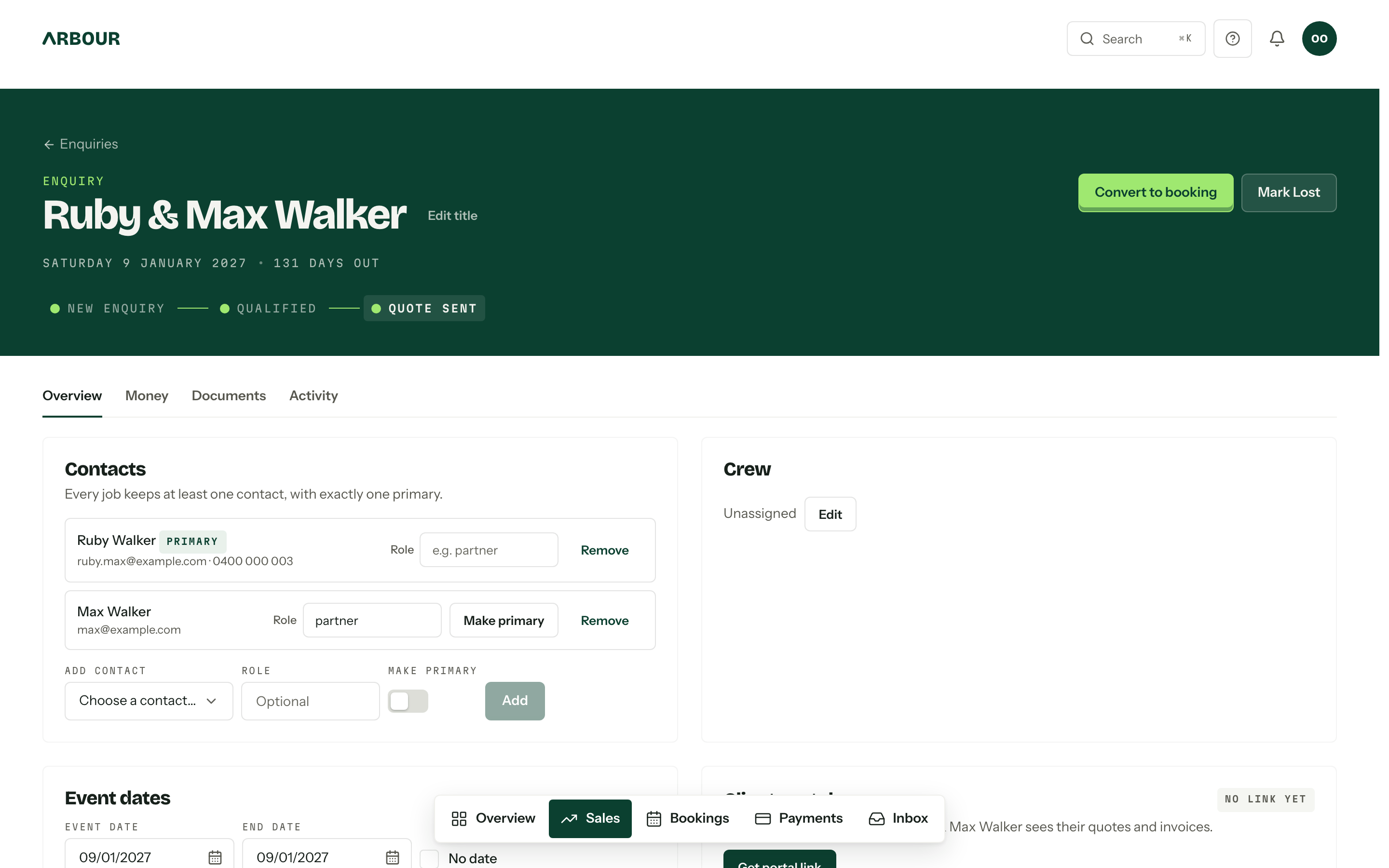
The band at the top
The stage stepper is the quickest way to move an enquiry: one press on the stage it belongs in. The stages it offers, and the labels on Mark Lost and the closed outcomes, come from the enquiry's own workflow. Clicking the dates under the name jumps to the Event dates card where they are set.
The action row, in order:
- Brief me opens Arby's one-page summary of everything on the job, for a call or a handover. It shows when the AI assistant is on and your role can use it. See Brief me.
- Open client portal opens the client's view in a new tab. Before a link exists, roles that manage portal links see Create portal link here instead.
- Convert to booking and Mark Lost, or Reopen on a closed enquiry. Converting lands the job in a booking stage of that same workflow, and nothing ever moves to another workflow.
More actions, the ellipsis at the end of the row, holds Delete enquiry. Deleting is permanent, with no archive and no undo: the enquiry goes, and with it the quotes, invoices, questionnaires, client tasks, portal messages, files and activity, and the client's portal link stops working. Contacts and email conversations stay. An enquiry cannot be deleted while it carries an issued invoice, a payment that is not failed or expired, or a contract anyone has signed, and the dialog names what is holding it before anything happens.
The name is derived from the linked contacts, so two people sharing a surname read as one couple. Edit title overrides that with anything you like, up to 200 characters. Clearing the field again hands the name back to the contacts.
A client photo can sit beside the name, so the team remembers who they are working with. With none, an empty circle appears beside the name while you edit the title: press it to add a PNG or JPEG up to 5 MB. Press an existing photo for Replace photo or Remove photo. Both need the permission to edit enquiries and bookings.
Overview
Contacts holds the people on the job. Every job keeps at least one, with exactly one primary, and the primary is who the portal and the email composer address by default. Each row takes a free-text role (partner, planner, mother of the bride), and Add contact links someone who already exists in Contacts. Removing the primary asks you to nominate a replacement first, because the job cannot be left without one.
Crew is the assignee list. Edit opens the member checkboxes, and it needs the assign permission.
Event dates takes the start, an optional end, or No date while nothing is settled. If a date clashes with an assignee's unavailability, the card says so after saving.
Appointments holds the calls, walkthroughs and meetings booked on the enquiry. New appointment books one; a request the client sent from the portal waits here for Accept or Decline. See Appointments.
Client portal is the stable private link where the client sees their quotes and invoices, with a badge saying No link yet, Active or Revoked. Create portal link creates it, and once it exists the link shows on the card with Copy link beside it. Seeing, creating, rotating, revoking and restoring a link need the Rotate and revoke client portal links permission. Rotate link creates a fresh URL and kills the old one on the spot. Revoke stops the link working until you Restore it.
Custom fields renders the fields belonging to this enquiry's workflow, in the order set in Custom fields. Edit them in place and press Save fields once. File fields take attachments through Attach file instead of a text box. Everything here survives conversion to a booking.
Tasks holds the team's own to-dos for this job, which the client never sees, and shows for roles that can view tasks. Add task creates one, Apply template adds a task template, and Show completed brings back finished tasks. Marking the enquiry lost cancels its open tasks; reopening it brings them back. See Tasks.
Running automations lists the stage automations going on this enquiry: how far each has got and what it is waiting for. It shows while something is running, and always for members who can manage automations, who also get a Cancel button on each run.
Client tasks, when client tasks are switched on, is the client's own to-do list in the portal. See Client portal.
A few more cards appear only when they have something to show: Enquiry answers (what the form asked and what came back, as asked at the time), Details (the original enquiry message), and Drafts, your own unsent emails on this job.
Money and Documents
Money opens on tiles for accepted, invoiced, paid and outstanding, then the Quotes card. New quote starts one from a template or blank, and a quote stays a private draft until it goes out. Statuses run Draft, Sent, Accepted, Declined and Withdrawn. See Sending a quote.
Money also lists the job's invoices under the quotes.
Documents carries contracts, which appear once a quote has been accepted, and Job documents: files kept against the job, including anything brought across by an import. The Money tab is permission-gated, so a member without quote or payment visibility does not see it at all.
Messages
The Messages tab holds the client's portal conversation. It appears once a portal link has been created, while Messages is enabled for the organisation. See Messages for attachments, read receipts and notifications.
Activity
The Activity tab is the record's memory: stage moves, quotes, payments, appointments, completed tasks and portal changes written automatically, your own notes and calls, and any email threads linked to the job. Send email starts a message to the primary contact. Below the feed, Log activity records a note, phone call, meeting, SMS or email against a time you choose.
The feed is yours, not theirs
Nothing on the Activity tab reaches the client, and neither does the reason recorded when an enquiry is marked lost. Both stay in the console.
Who can do what
Editing the fields, dates, title and stage all sit behind one permission, editing enquiries and bookings. Assigning crew, rotating the portal link, and seeing the money are separate again. Deleting has its own permission, Delete enquiries and bookings, which a role cannot hold without the edit permission. See Team and roles.