Enquiries is the sales half of the pipeline: everyone who has asked about your work, from first contact to quote. It opens on a board, one column per stage, one card per open enquiry.
Open enquiries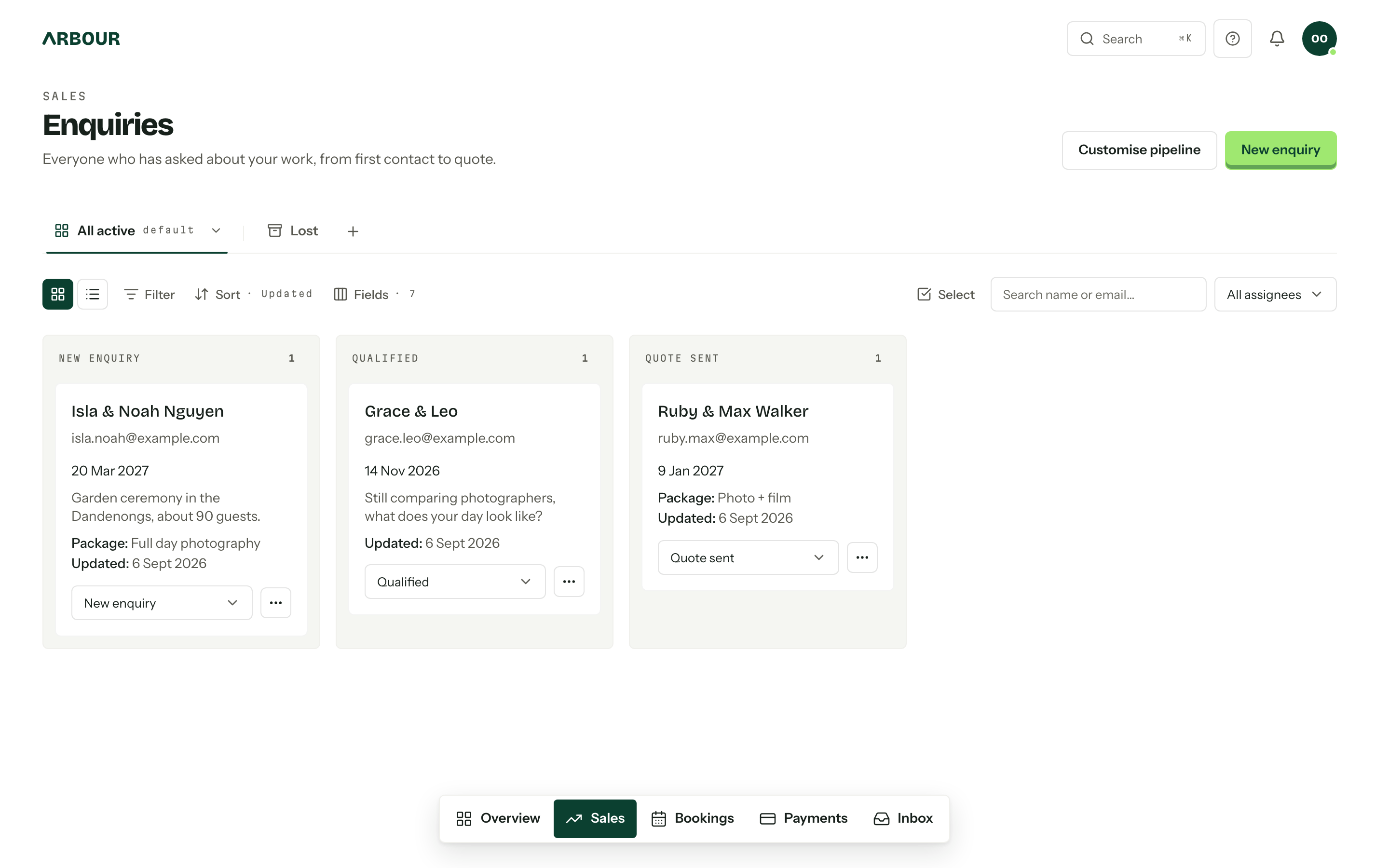
Workflows
The workflow menu beside the board's title says which workflow you are in. A workflow is one enquiries board and one bookings board for a service line, with its own stages, outcome labels, custom fields, forms, views and automations. Most organisations run the one they start with, called Default; a venue doing weddings and corporate work can run up to five. The board opens on the workflow you used last, and the address carries it so a link opens where you were. See Workflows.
Stages
A new organisation starts with three: New enquiry, Qualified and Quote sent. Each column header carries the stage name and a count of what is sitting in it. Drag a card across to move it, or use the stage picker at the foot of the card when a drag is awkward. The order cards are dragged into is shared, so the whole team sees the same board.
Stages are arranged in Settings, under Workflows: open a workflow to rename, reorder, add and remove its enquiry stages, then press Save to apply the lot at once. Removing a stage asks where its cards should land first. Manage workflows, in the workflow menu beside the board's title, is the way through, and it only shows for members who can manage workflows, stages and automations.
Views, filters and search
The tabs above the board are views. All active and the Lost tab are built in; anything else is a view of your own. The bar under them filters, sorts, picks the fields, switches between the board and list layouts, and holds Quick search and the assignee filter. A long stage shows its first 50 enquiries, with View more under it for the next lot. See Board and list views.
Log one by hand
Website enquiries arrive on their own. For the ones that come by phone, or at a wedding fair:
- 01
Press New enquiry. It starts in the workflow you are looking at; change the Workflow, Type or Stage at the top of the dialog if the job belongs somewhere else.
- 02
Set the Event date, and an End date for a job over several days. Tick No date if nothing is settled yet.
- 03
Fill in the primary contact, either New person (first name, last name and email) or From contacts. Add secondary client covers the partner.
- 04Press Create. The enquiry opens on its own page.
Title (optional) is there if a job wants its own name. Left empty, it reads as the linked contacts. Custom fields and assignees sit at the bottom of the dialog. If an assignee is unavailable on the job's dates, the enquiry is still created and a second dialog names the clash, with View record to open it.
⌘ Enter presses Create from anywhere in the dialog. See Search and shortcuts.
Assign, convert, close
Assignees are picked in the create dialog and edited on the enquiry itself. Cards show the avatars, they do not change them. Assigning is its own permission.
Convert to booking, in a card's actions menu, asks for a Booking stage in the enquiry's own workflow and moves the record over. It keeps its portal link, quote and history, and it leaves this board for Bookings.
Mark Lost, in the same menu, closes an enquiry. Reason (optional) stays in the console and is never shown to the client. The card leaves the board and keeps its stage, so Reopen under the Lost tab puts it straight back where it was. Closing also cancels the enquiry's future appointments and emails the client about each; reopening does not book them again.
Delete enquiry, at the bottom of that menu (and of a row's menu in the list layout), is permanent: the enquiry and everything on it go, with no archive and no undo. It shows only to roles holding the delete permission, and the dialog names anything that stops it before you confirm.
Work on several at once
Select, on the right of the bar, ticks cards or rows so you can email, move, close or delete them together. Board and list views covers the selection bar.
Converting is one way
A booking cannot be turned back into an enquiry. If a job falls over after it converts, close the booking as cancelled rather than looking for an undo.
Who can do what
Viewing, creating, assigning, editing (which covers moving, closing and converting) and deleting are five separate permissions, so a role can hold some without the rest, though deleting always needs editing alongside it. Someone without the wider view permission sees only what is assigned to them. Deleting is permanent and takes the whole record with it, including the client's portal messages and their tasks, the quotes, invoices, questionnaires, files and activity. An enquiry carrying an issued invoice, a payment that is not failed or expired (pending and processing count), or a contract anyone has signed cannot be deleted at all. An unsigned contract goes with the enquiry. See Team and roles.