An automation is one sentence with three parts: when this happens, only if these match, then do this. Arbour ships six of them and you can write your own. They live in Settings, under Automations.
Open automations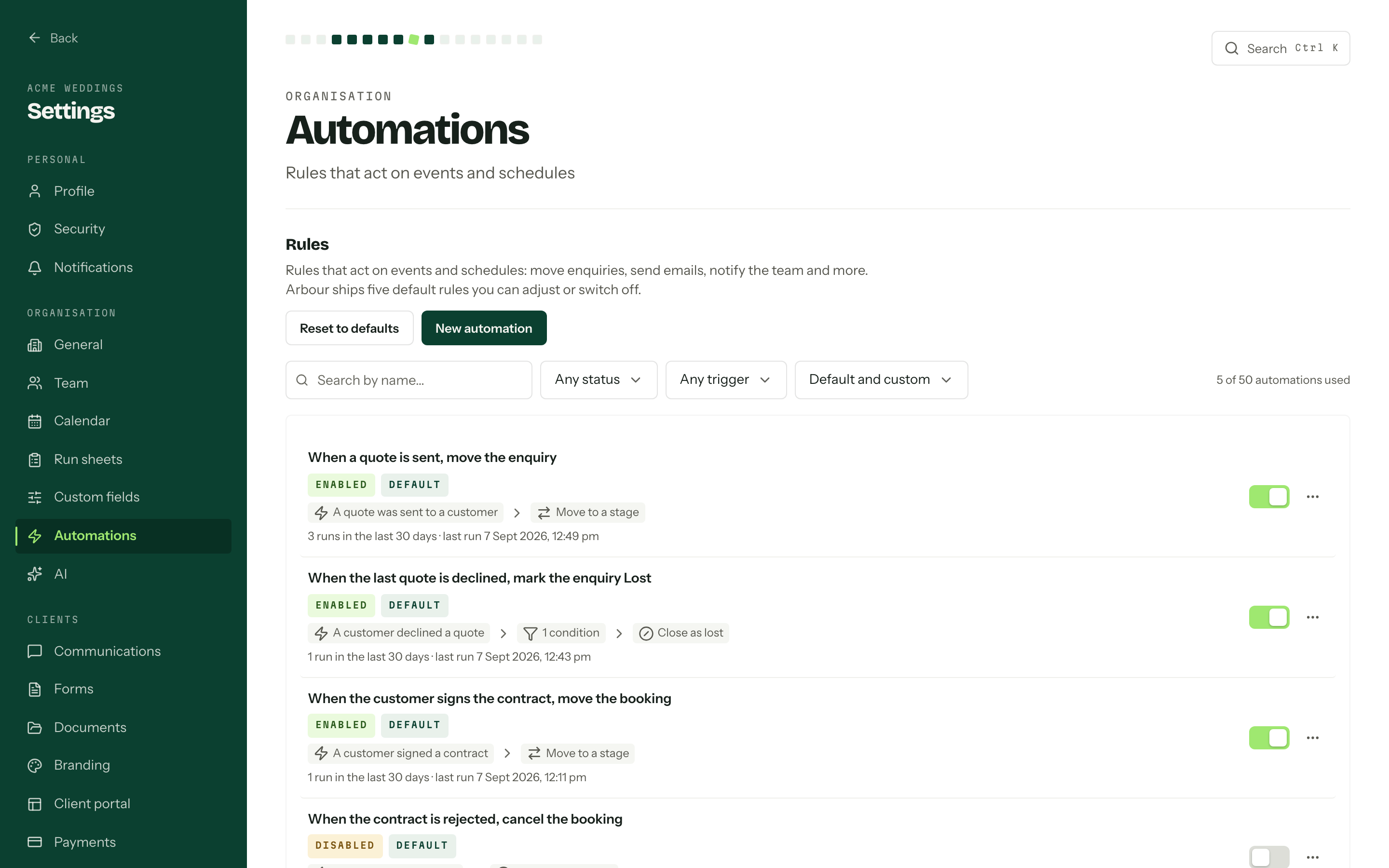
What starts a rule
Runs is the first choice in the editor, and it changes everything after it.
- When something happens watches for an event: a quote accepted, a contract signed, a payment taken. Pick it from the gallery on the new rule page.
- On a date around the event counts days before or after the event date, at a time of day you choose.
- On a schedule repeats daily, weekly or monthly.
- When a job enters a stage follows an enquiry or booking for as long as it sits in one stage. It works differently from the rest, so it has its own section below.
Workflow says whose work the rule watches. Pick a workflow and the rule only ever fires on that one's enquiries and bookings, and the stage and field pickers below show that workflow's stages and fields and nothing else. All workflows is available while the rule mentions no stage and no field, for something like an email that suits every service line.
Conditions narrow it. Leave them empty and the rule runs every time; add some and it runs only when they match, checked again at the moment it fires rather than when it was queued.
Steps are what happens, in order: notify members, send an internal email, send a customer email, move an enquiry or booking to a stage, close one, assign members, log an activity, create a task, apply a task template, call a webhook, or wait a while before the next step. A rule with a webhook step gets a signing secret, shown once when you save it. See Webhooks.
The rules you already have
Six default rules come with every workflow, marked Default on their card, and they are yours to change or switch off:
- When a quote is sent, move the enquiry
- When the last quote is declined, mark the enquiry Lost
- When the customer signs the contract, move the booking
- When the contract is rejected, cancel the booking
- When the confirming payment succeeds, move the booking
- Apply the booking checklist
Apply the booking checklist is switched off when it ships. Switch it on and every enquiry that becomes a booking gets the tasks in the workflow's Booking checklist task template: confirm details with the primary contact, call them two days before the event and send the final invoice the day after it. Edit the template to change the tasks; resetting the defaults never rewrites it.
Reset to defaults puts all six back to how they shipped, in every workflow, and recreates any you deleted. Rules you wrote yourself are not touched. The Origin filter separates Arbour defaults from Created by us, and the counts on the right of the filter row, Events and Stages, show how many of your 50 rules and 50 stage automations are in use.
When a job enters a stage
A stage automation is a run of follow-ups tied to one stage on one workflow's enquiries or bookings board. The job lands in the stage and the automation starts; it leaves and the automation stops. The list marks these with a Stage badge, and the automation's own page says "Stops as soon as the job leaves this stage."
When it starts
It starts whenever an enquiry or booking arrives in its stage:
- Moved there, by a member or by an automation
- Created there, from an enquiry form or in the console
- Converted into it, when an enquiry becomes a booking
- Reopened while it sits there
Each arrival starts a fresh run from the top, so a job that leaves and comes back starts again. A stage can have several automations and each one runs on its own. Switching one on does not reach back: jobs already sitting in the stage do not start it.
When it stops
The run is cancelled as soon as the job leaves the stage, whichever way it goes: moved to another stage, converted to a booking, closed as Lost, Completed or Cancelled, or deleted.
Deleting the stage itself cancels its runs and switches the automation off. Its card says Stage removed and it stays off until you open it and pick a new stage. Arbour will not switch it back on before then.
A stage automation that moves or closes the job itself is not cancelled by doing so. That step is always the last one on its path, so the run finishes there.
What goes in one
Instead of a list of steps, a stage automation is a tree you build from the top down. Each node runs when the one above it finishes.
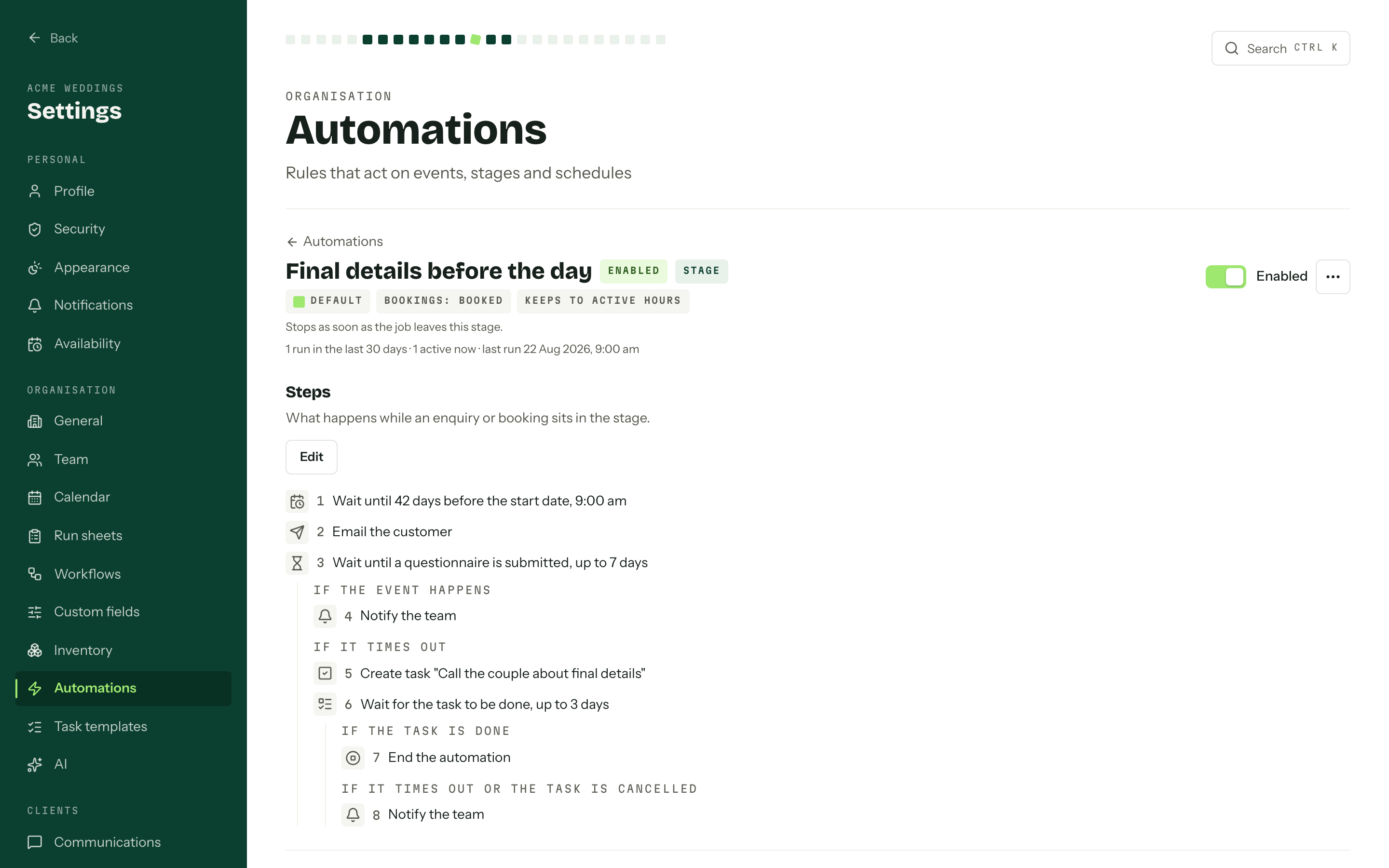
- Action: the same steps as any rule. Notify members, send an internal email, send a customer email, move the job, close it, assign members, log an activity, create a task, apply a task template or call a webhook. There is no wait step here; use a wait node.
- Wait: a fixed time, up to 90 days.
- Wait until the event date: a number of days before or after the job's start or end date, at a time of day in your organisation's timezone. If the job has no date, or the moment has already passed, the run carries straight on and its history says why.
- Wait for an event: up to three things happening on this job. A quote accepted, declined or withdrawn, an invoice issued, a payment succeeding, the customer signing a contract, a contract completed or rejected, or a questionnaire submitted or resubmitted.
- Wait for a task: resumes when a task that a Create a task step made earlier on the same path is done.
- Branch: checks conditions, the same ones rules use, at the moment the run gets there.
- End: stops the run.
A branch splits the tree in two: When conditions match and Otherwise. A wait for an event or a task splits too: one path for when it happens, and If it times out. The timeout is optional. Without one, a wait for an event holds until the job leaves the stage. A task that is cancelled, or never got created, takes the timeout path.
Paths never join back up. Anything that splits must be the last node in its list, and so must an End or a step that moves or closes the job. Build what happens next inside each path.
A stage automation can hold 40 nodes, and paths can nest three deep. Each organisation can have 50 of them, on top of its 50 other rules. Runs follow the automation as it was when they started, so edits apply to the next job that arrives. Switching one off stops its runs the next time they come back from a wait.
One stage automation can move a job into another's stage, which starts that one. Automations can set each other off up to ten times in a row; after that the chain stops and the run says so.
Active hours
Active hours are one daily window, set at the foot of the automations page: a start and an end in your organisation's timezone. It cannot run past midnight. No window clears it. Each stage automation has its own Keep customer emails to active hours switch, and no other rule is affected.
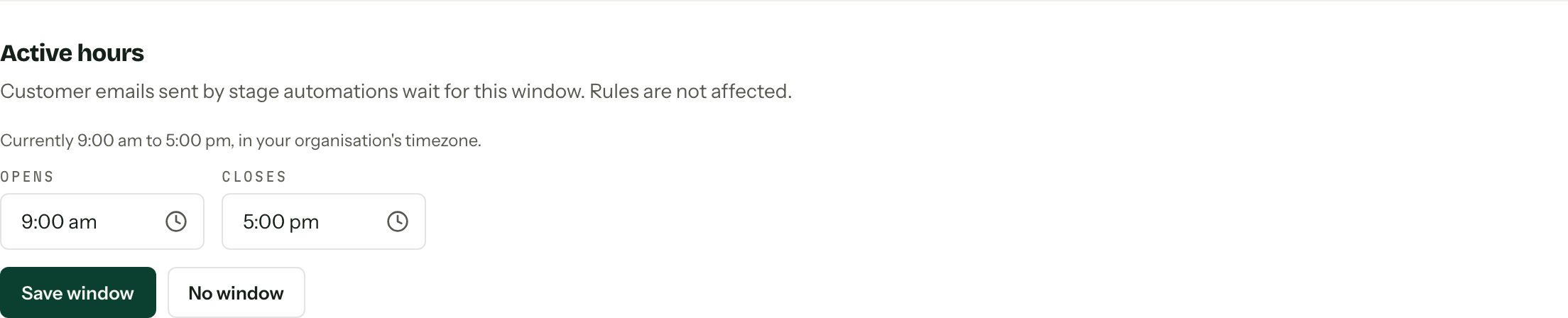
Only customer emails wait for the window. With a 9 am to 5 pm window, a customer email due at 11 pm goes at 9 the next morning. Everything else in the automation runs on time.
Watching a run from the job
The Running automations card on an enquiry or booking's Overview lists the stage automations going on it right now: which one, how far along it is, and what it is waiting for. Anyone who can open the job sees the card while something is running. Members who can manage automations always see it, with a Cancel button on each run.
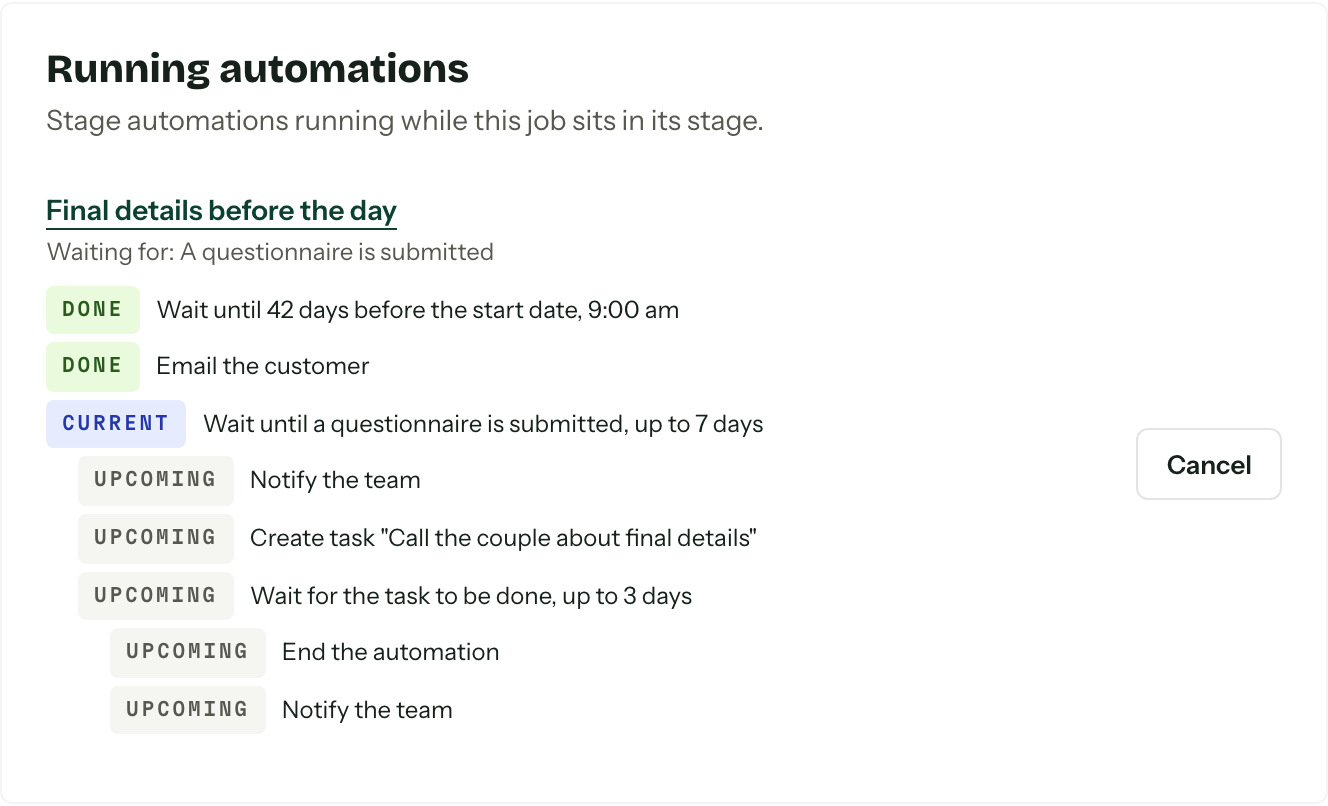
A cancelled run says why:
| Reason | What happened |
|---|---|
| The enquiry or booking left the stage | It was moved or converted out of the stage |
| The enquiry or booking was closed | It was closed as Lost, Completed or Cancelled |
| The record no longer exists | It was deleted |
| The stage was removed | The stage was deleted from the workflow |
| Cancelled by a team member | Someone pressed Cancel on the job's card |
Closing jobs with inventory
A rule that closes a job as Cancelled or Lost releases its Reserved and Out hire allocations, just as closing it manually does. That includes the default rule that cancels a booking when the client rejects the contract. Reopening the job does not reserve released items again.
Completing a booking keeps the allocation statuses, but the closed booking stops counting against availability. Reopening it makes any remaining Reserved or Out allocations count again. Review returns before completing the job; an automation cannot confirm that equipment is back. See Stock for bookings.
Reserving package requirements when a client accepts a quote is built into quote acceptance when inventory and hire tracking are enabled. It does not need an automation rule. Likewise, an Assign members step changes the job's crew list; it does not assign crew gear.
Build with Arby
If you would rather describe an automation than build it step by step, the Build with Arby button at the top of the automations page, beside New automation, opens a chat with Arby beside the list. An empty build offers three examples to start from. Write what should happen in plain words, the way you would explain it to someone new on the team: what starts it, what should happen, who it is for and how long to wait. For example: "When a quote is sent, wait three days and email the client if they haven't replied." Naming the workflow, the stage or the team member helps. If something that matters is unclear, Arby asks before it drafts anything.
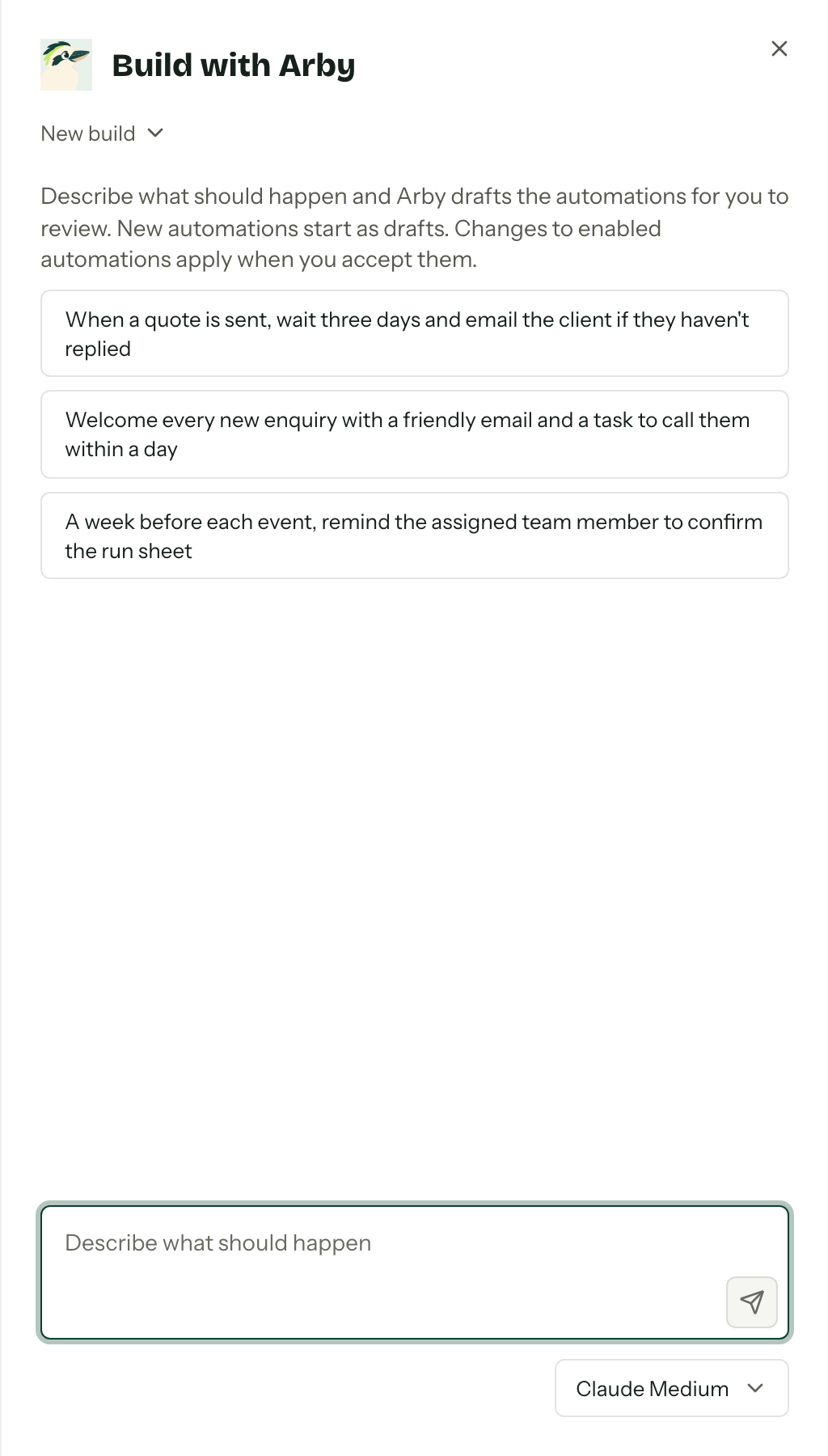
Arby reads your workflows, stages, fields, templates and the automations you already have, never your clients' records, and answers with one or more proposals. Each one shows the steps it would run and a sentence on what it does. Customer emails are written in the brand voice from your AI assistant settings. Arby can also propose a change to an automation you already have, shown as Now and Proposed.
Arby proposes; nothing runs until you add it and switch it on. On each proposal:
- Add as draft saves it as a Draft automation, switched off. A change to an existing automation says Apply changes instead and updates that automation straight away, so check it first if it is switched on.
- Review opens it in the editor, so you can check the steps and the wording of any email before you save.
- To ask for changes, just reply in the chat. The new version replaces the old one.
- Dismiss sets it aside without creating anything.
Each conversation is a build. The switcher under the title lists your previous builds, with how many proposals each has left to review, starts a New build and deletes the open one with Delete build. The model picker under the message box chooses which model drafts; it is the same choice as on AI assistant. Your builds are yours alone, and one nobody has touched for 90 days is deleted, though the automations you added from it stay. You need the Use the AI assistant permission as well as the one to manage automations, and the organisation's AI assistant switch has to be on. See Arby.
Pausing a rule
The switch on a card enables and disables a rule without opening it, and it asks first, because enabling one means matching events can start it straight away. A disabled rule stops being started by new events and schedules; anything mid flight is not retrospectively undone. Duplicate in the row menu is the safer way to try a change: copy the rule, edit the copy, leave the original off.
Draft, enabled, disabled
A rule saved without being switched on sits as Draft and never fires. It is the state to leave something in while you are still deciding.
Runs and steps
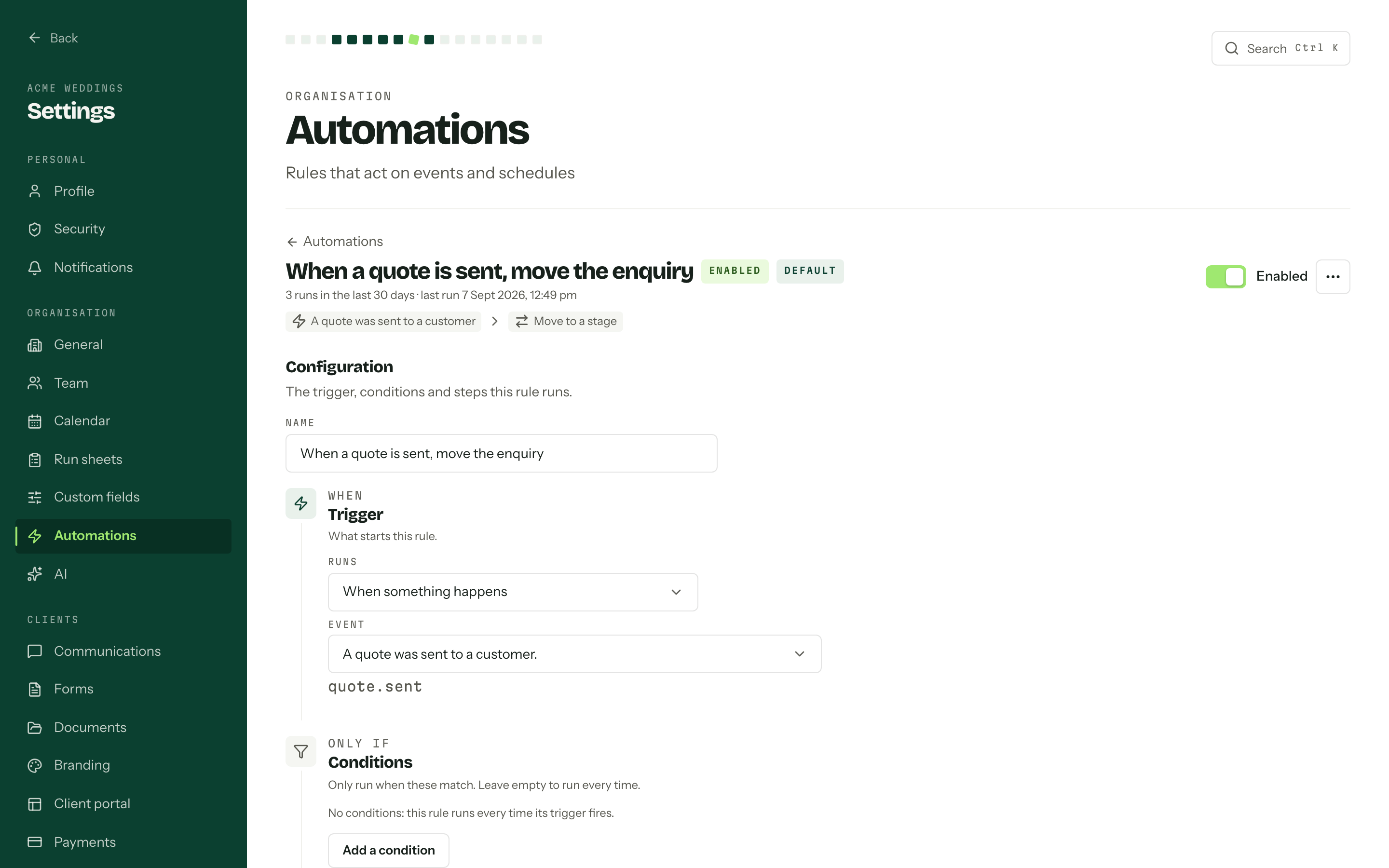
Open a rule and Run history shows the last 30 days, newest first: the record it ran against, what started it, and where it got to. Succeeded and Failed are self explanatory. Waiting is a rule sitting on a wait step, with the time it resumes. Skipped and Cancelled say why in plain words, the common ones being that the conditions no longer matched or that a later event superseded the run.
Steps on a run expands it into the individual actions, each with its attempt count and outcome. A failed step has its own Retry, so a webhook that was down for ten minutes does not cost you the whole run. In a stage automation, a failed action does not stop the run either: it carries on to the next node, and a path that was not taken shows as skipped.
Who can use them
Automations need the permission to manage automations, for building them, switching them on and off, setting active hours and cancelling a run from a job. Members without it get "Your role cannot manage automations." in place of the page, and the API refuses them the same way. API keys cannot manage automations. See Team and roles.