Arby is the assistant that reads your organisation's records and answers questions about them. Who is booked in March, which invoices are overdue, what the last email on a job said. It reads only what you can already see, and it changes nothing.
Opening it
The Arby button sits in the top bar beside Search. ⌘ J opens it from anywhere (Ctrl J on Windows and Linux), and the same keystroke closes it. The settings screens have no top bar, so on those the shortcut is the way in.
It opens as a sheet on the right and stays open while you move around the console, so you can read an answer and open the record it points at without losing the thread.
Arby also turns up in three other places, each with its own job: drafting email in the composer (see AI assistant), Build with Arby on the automations page (see Automations) and Brief me on a booking or enquiry (see Brief me).
The sheet
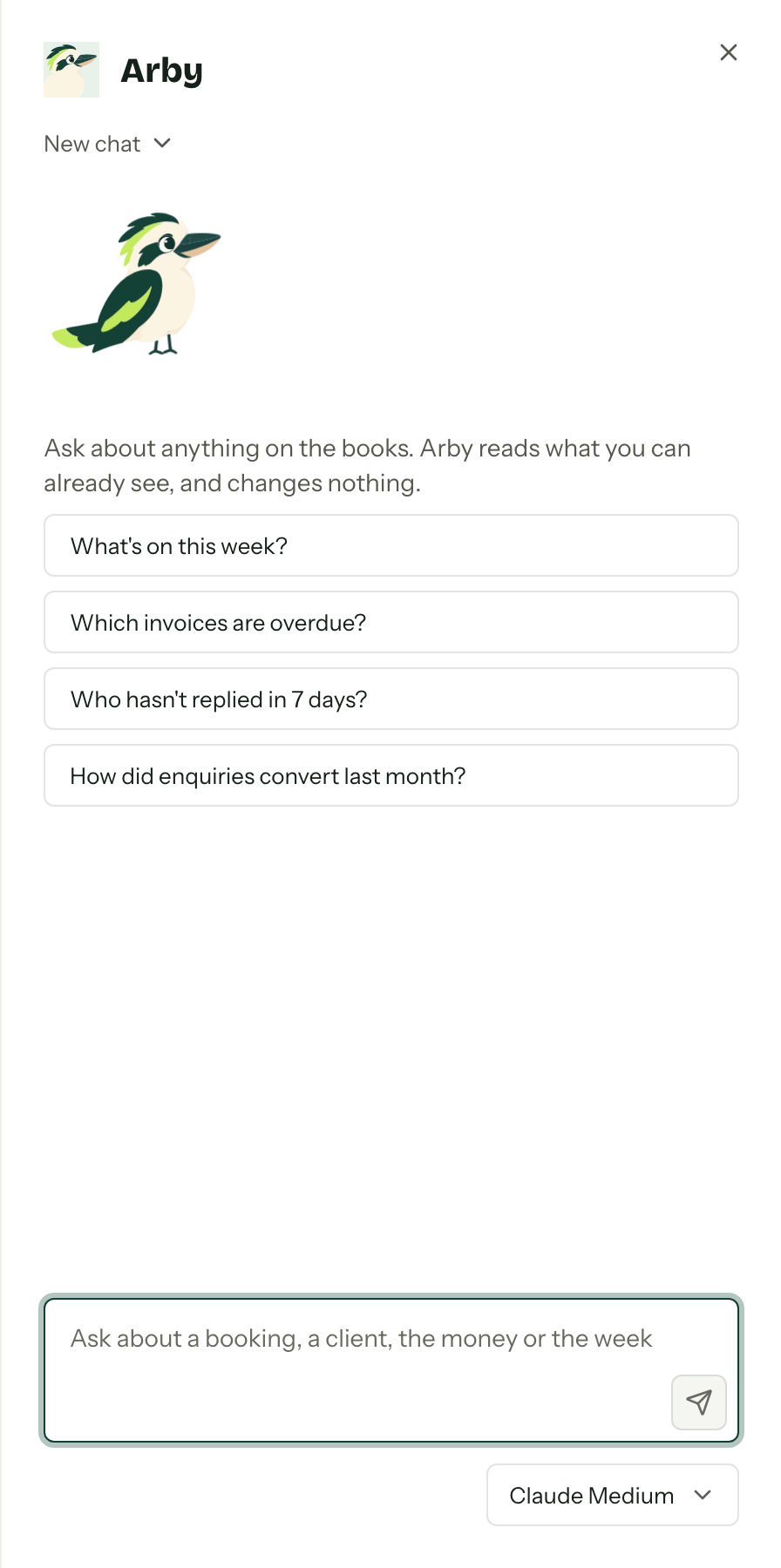
The chat's name sits under Arby at the top of the sheet, and it is a menu: switch to another chat, start a New chat, or Delete chat to throw the current one away. An empty chat offers a few starter questions, filtered to the ones your role can actually answer.
Then there is the box at the bottom. Ask in plain English. The model picker under it chooses which model answers; see Choosing a model.
Arby knows which record you have open. On a booking, an enquiry, a contact or an email conversation, "when is this one's final payment due?" means that one, unless you name another.
What it can answer
Anything the console holds about your own organisation:
- Bookings and enquiries, including who is assigned and what stage they sit in
- Contacts and their history
- Quotes, invoices, payments and contracts
- The calendar, availability and clashes
- Email conversations
- Inventory items, stock availability and gear assignments
- Reports
- The team, the packages and the settings you manage
The list is really your role's list. Arby reads through your permissions, the same ones the screens use, so a member on assigned bookings only gets answers about their own bookings, and a member without payments never gets a figure from an invoice. When a question needs something outside that, Arby says plainly that it cannot see it and offers what it can.
For inventory questions, your role needs View inventory. Try "What is available next Saturday?" or "What gear does Sam have?" Seeing your own crew gear without that permission does not give Arby access to inventory. See Inventory availability and Crew gear.
What it will not do
It cannot send, edit, create, delete, pay or book. It cannot reserve stock, assign gear or record a return. Ask it to email a client and it will say so, then point you at the record so you can do it yourself. It never reads another organisation, including the other ones you belong to: the answer comes from the organisation you are currently in.
Reading an answer
Links open the record in the console. Figures come straight off the records, so the total Arby reads out is the total on the invoice, and if the records do not hold an answer it says that rather than inventing one.
While it works, the small lines under the answer say what it is looking at: Looking up bookings, Checking invoices, Searching email.
Choosing a model
The picker under the message box offers Medium and High. High runs a larger model. When your organisation has both providers available, the picker names them: GPT Medium, GPT High, Claude Medium and Claude High. Until you pick, Arby uses Claude Medium where Claude is offered, otherwise Medium.
Picking a model here saves it as your choice everywhere Arby runs, in this organisation: the composer, Build with Arby and Brief me use it too. You can also set it on AI assistant under Your writing voice. If the model you chose stops being offered, Arby goes back to the default until it returns.
Brief me
Brief me on a booking or enquiry asks Arby for a one-page brief of the job, for reading before a call or at a handover. It has its own page: see Brief me.
When it says no
Mostly limits, and they are temporary.
- "You have reached the AI assistant's limit." There is an hourly cap on how much anyone can generate, shared by every place Arby runs, and a cap on how many answers one person can have going at once. The message says how long until you can ask again.
- "Arby is already answering in this chat." The same chat is answering in another tab. Wait for it to finish.
- "Arby took too long" or "Arby could not finish". Something went wrong on the way. Whatever had arrived stays on screen.
Retry sits under a failed answer to send the same question again.
Privacy
Questions go to OpenAI's API or Anthropic's API, depending on the model that answers: GPT models are OpenAI's, Claude models are Anthropic's. A question can include the question itself, the chat so far, and whatever Arby reads to answer it: the contacts, bookings, quotes, invoices, payments, calendar, email, inventory and settings you can already see in Arbour. Both providers state that API requests are not used to train their models, and Arbour does not opt in to training. The full disclosure lives on AI assistant.
Your chats are yours: nobody else in the organisation can open them. They go when you delete them, and a chat nobody has touched for 90 days is deleted for you.
Two things have to be true
Your role needs the Use the AI assistant permission, and the organisation's AI assistant switch has to be on. Both live in settings: the switch on AI assistant, the permission on the role. See Team and roles. While an account is read-only, the Arby button goes away; a saved brief can still be read, but not refreshed.