An endpoint is a URL of yours that Arbour posts to the moment something happens: an enquiry arrives, a quote is accepted, a payment lands. Signed, retried, and carrying identifiers rather than the record itself, so your receiver fetches the detail through the API with an API key. Webhooks sit in the middle of the integrations screen, and the section is invisible to roles without Manage outbound webhooks.
Open integrations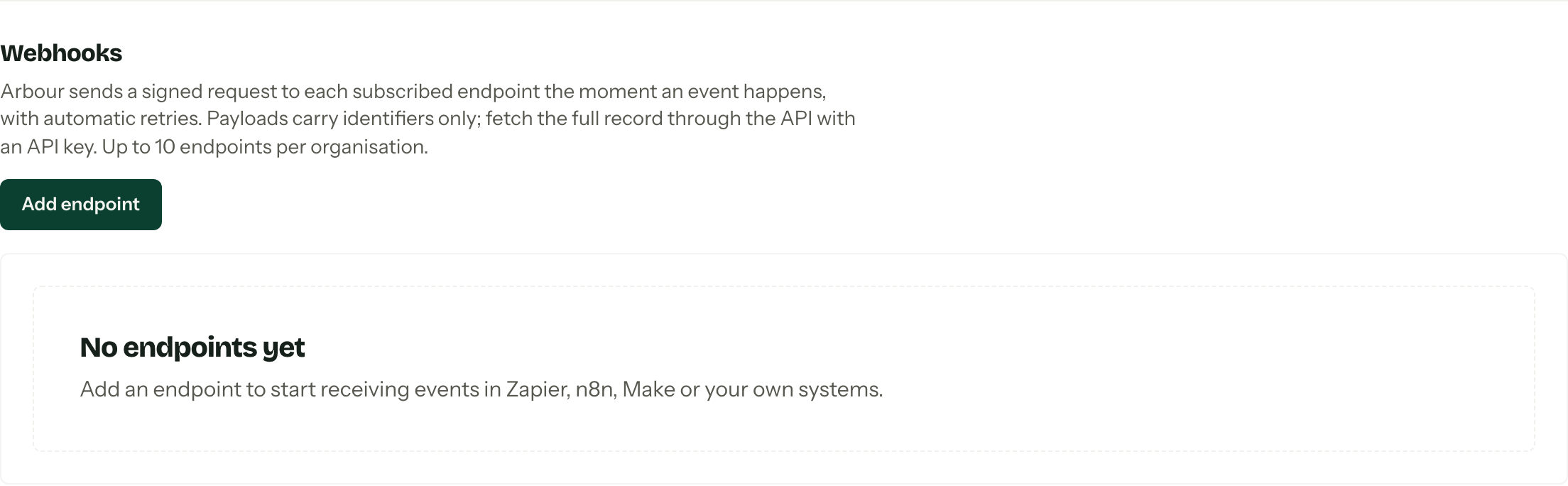
Choose your platform
These guides each build the same automation: add a new enquiry to Google Sheets, fetching its details from Arbour and checking for an existing row before adding another.
| Platform | Guide |
|---|---|
| n8n | Connect webhooks to n8n |
| Zapier | Connect webhooks to Zapier |
| Make | Connect webhooks to Make |
The guides use each platform's webhook and HTTP tools. You do not need a native Arbour connector. For your own receiver, use the payload and signing reference below.
Add an endpoint
- 01
Press Add endpoint. Give it a Label you will recognise in six months and an Endpoint URL, which must be https.
- 02
Either flip Subscribe to all events, which also picks up anything added in a future release, or tick the events you want from the list.
- 03
Press Create endpoint. The signing secret appears once, right then. Copy it into your secure credential store before you close the dialog. It is separate from your API key and is used to verify incoming requests.
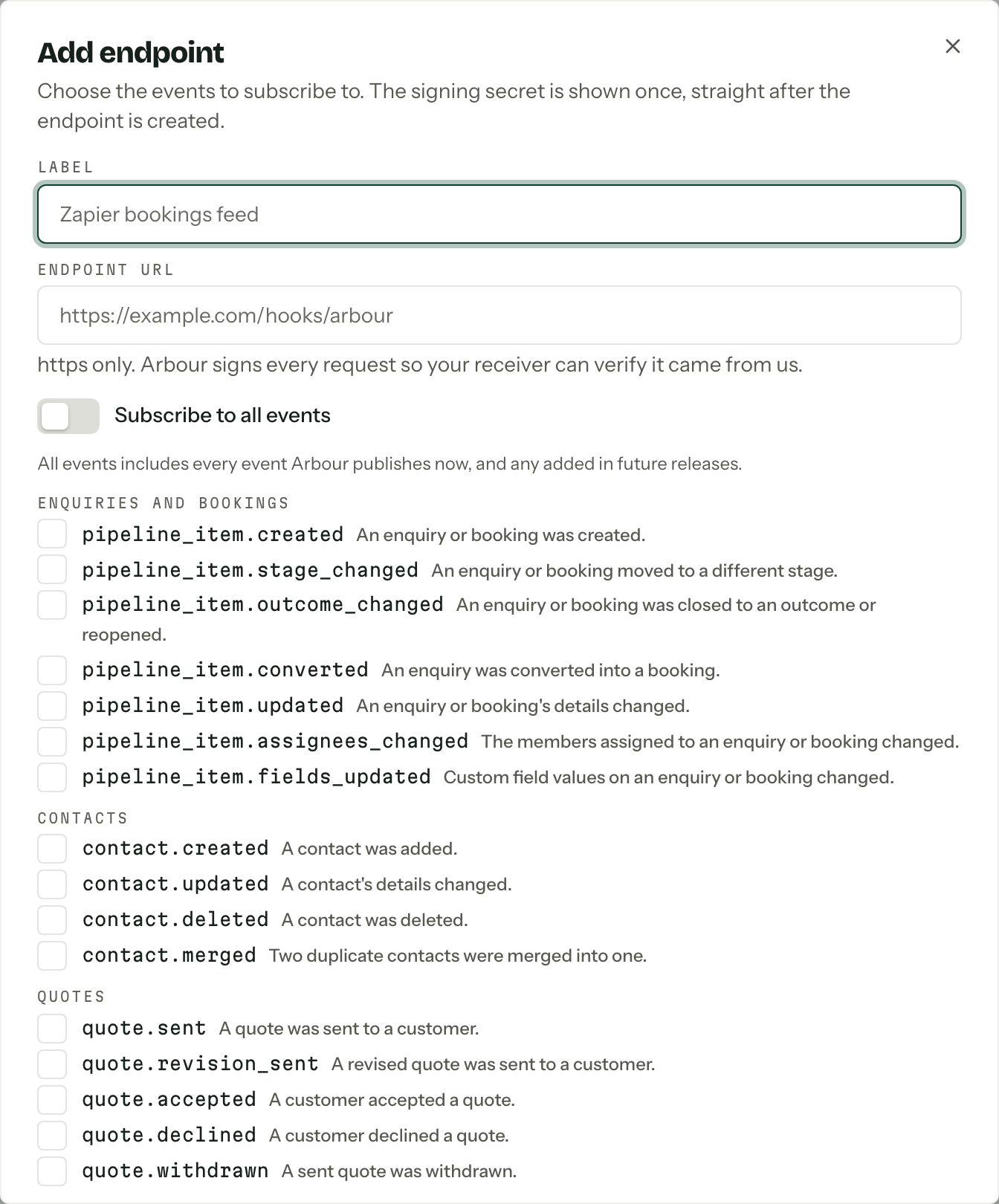
Ten endpoints per organisation is the ceiling. Each row in the list carries an Active, Disabled or Disabled after failures badge.
The events
| Group | Events |
|---|---|
| Enquiries and bookings | pipeline_item.created, pipeline_item.stage_changed, pipeline_item.outcome_changed, pipeline_item.converted, pipeline_item.updated, pipeline_item.assignees_changed, pipeline_item.fields_updated |
| Appointments | pipeline_item.appointment_booked, pipeline_item.appointment_requested, pipeline_item.appointment_rescheduled, pipeline_item.appointment_cancelled, pipeline_item.appointment_completed |
| Contacts | contact.created, contact.updated, contact.deleted, contact.merged |
| Quotes | quote.sent, quote.revision_sent, quote.accepted, quote.declined, quote.withdrawn |
| Invoices | invoice.issued, invoice.adjusted, invoice.voided |
| Payments | payment.succeeded, payment.failed, payment.refunded, payment.voided, payment.expired, payment.succeeded_on_void_invoice |
| Contracts | contract.sent, contract.customer_signed, contract.countersigned, contract.completed, contract.rejected |
| Questionnaires | questionnaire.sent, questionnaire.submitted, questionnaire.resubmitted |
Read the payload
Arbour sends an HTTPS POST with a JSON body. The envelope describes the event; data contains identifiers and event-specific values, not the complete record. These fictional examples show the shape. Their IDs will not fetch a real record.
A new enquiry
{
  "version": 1,
  "type": "pipeline_item.created",
  "occurredAt": "2026-09-06T00:00:00.000Z",
  "organizationId": "org_example",
  "subject": { "type": "pipeline_item", "id": "pli_example" },
  "data": {
    "pipelineItemId": "pli_example",
    "type": "enquiry",
    "pipelineId": "pip_example",
    "stageId": "stg_example",
    "formId": null,
    "formSubmissionId": null,
    "formSource": null
  }
}
This is a manually created enquiry. A form submission supplies the form IDs and a formSource of hosted or embedded. The outer type is the event name; data.type is enquiry or booking. Filter on both to collect only new enquiries.
Fetch the record with GET https://api.usearbour.com/v1/pipeline-items/{data.pipelineItemId}, replacing the placeholder with the received ID. Send Authorization: Bearer arb_... using a saved API key. Do not send X-Arbour-Org: the key already belongs to one organisation. Use the fixed Arbour API host, never a host supplied in an incoming payload.
The response has id, displayName, stage.name, startDate and createdAt at the paths shown. startDate can be null. This is the record's current state, which may have changed since occurredAt. A record deleted before retrieval returns 404.
A test ping
{
  "version": 1,
  "type": "ping",
  "occurredAt": "2026-09-06T00:00:00.000Z",
  "organizationId": "org_example",
  "subject": null,
  "data": {}
}
Send test ping checks whether your receiver answers. It is signed, but it has no record ID or enquiry fields and creates no entry in the delivery log. Capture a real event from an enquiry with fictional details before mapping fields. Pings must stop before the record-fetch and spreadsheet steps.
The signing secret
Every request carries these headers. Header names are case-insensitive.
| Header | Value |
|---|---|
X-Arbour-Event | Event name, or ping. |
X-Arbour-Delivery | Delivery ID, stable across automatic retries and manual redelivery. |
X-Arbour-Timestamp | Unix seconds for this attempt, refreshed when Arbour retries. |
X-Arbour-Signature | v1=<hex>, where <hex> is the lowercase HMAC-SHA256 digest. |
Use the complete signing secret, including whsec_, as the HMAC key. Do not strip the prefix or base64-decode it. Sign the timestamp header text, a full stop, then the exact raw request body bytes. Parsing and rebuilding JSON can change those bytes and break verification.
For a receiver running Node.js, this example accepts a raw Buffer, header strings and the secret from a secure store. It rejects missing or malformed headers, signatures that do not match, and timestamps more than five minutes in either direction from the receiver's clock. Keep that clock synchronised.
import { createHmac, timingSafeEqual } from "node:crypto";

function verifyArbourWebhook(secret, rawBody, timestamp, signature) {
  if (typeof timestamp !== "string" || !/^\d+$/.test(timestamp)) return false;
  if (typeof signature !== "string" || !/^v1=[a-f0-9]{64}$/.test(signature)) return false;
  const seconds = Number(timestamp);
  const now = Math.floor(Date.now() / 1000);
  if (!Number.isSafeInteger(seconds) || Math.abs(now - seconds) > 300) return false;

  const expected = createHmac("sha256", secret).update(`${timestamp}.`).update(rawBody).digest();
  const received = Buffer.from(signature.slice(3), "hex");
  return timingSafeEqual(expected, received);
}
Verify before parsing or acting on the body. Filter using the verified body's type; the event and delivery headers are not included in the signature. Use X-Arbour-Delivery to deduplicate Arbour retries, with a durable claim so concurrent attempts cannot both start the same work. Retain failed work for retry rather than treating a failed attempt as completed. The signature and timestamp check alone do not prevent a duplicate arriving inside the five-minute window.
Using an automation platform
The basic visual guides keep the receiver URL private but do not verify signatures. Anyone with that URL could submit a request. Treat it as a secret, restrict access to the workflow and keep API keys in saved credentials, never in a spreadsheet or example payload. Arbour API keys have full organisation access.
Advanced receivers need the raw body and headers. See each platform guide for its raw-data options. If you need to reject unverified requests before the platform accepts them, put a verifying HTTPS receiver in front: verify the request, durably queue accepted work, then answer 2xx within ten seconds. Forward accepted events to the private platform URL from that queue. A later workflow filter cannot undo an acknowledgement already sent to Arbour. Building and hosting that receiver is a separate task.
Rotate secret on the endpoint's page issues a new one and shows it once. The old secret stops working immediately, so have the new one ready to paste.
Deliveries and retries
Manage opens the endpoint (on a read-only account it reads View). Recent deliveries lists the last 30 days, newest first, each with its event type, the status your receiver answered, how many attempts it took and a status: Pending, Delivered, Failing or Gave up.
Answer any 2xx within ten seconds. Anything else is retried with a growing gap, starting a minute out and capped at six hours, for up to eight attempts before the delivery is marked Gave up. Those you can push again by hand with Redeliver. An endpoint that fails for a solid week with nothing getting through is disabled for you, badged Disabled after failures, and members who manage webhooks get a Webhook endpoint disabled notification. Fix the receiver, then press Enable.
Test before you trust it
Send test ping posts a signed request straight away and reports what came back. It is the fastest way to tell a signature bug from a firewall.
Receipt and completion are different
A 2xx tells Arbour that the receiver accepted the request. It does not prove that an API lookup or spreadsheet action finished. If the platform accepts a webhook and a later step fails, inspect and retry that run in the platform's history. Arbour does not automatically retry an accepted request, and Redeliver is available only for deliveries marked Gave up.
The spreadsheet guides look up an Enquiry ID before adding a row. That reduces duplicates when each new run performs the lookup, but two simultaneous runs can both see no row and both add one. A platform replay can resume after the lookup or reuse its previous result; check whether the row was already written before replaying an uncertain write. It is not an exactly-once guarantee. For stronger guarantees, use a destination with an atomic unique key or upsert and durable processing state. Do not assume events arrive in order.
Turning one off
Disable stops deliveries and keeps the configuration and the log; Enable starts them again. Delete endpoint removes both. Neither touches anything else in Arbour.