The overview is a day sheet. The rail on the left holds the things you start from this page. On the right, the desk names the work in front of you, and the reports sit under a rule below it.
Open the overview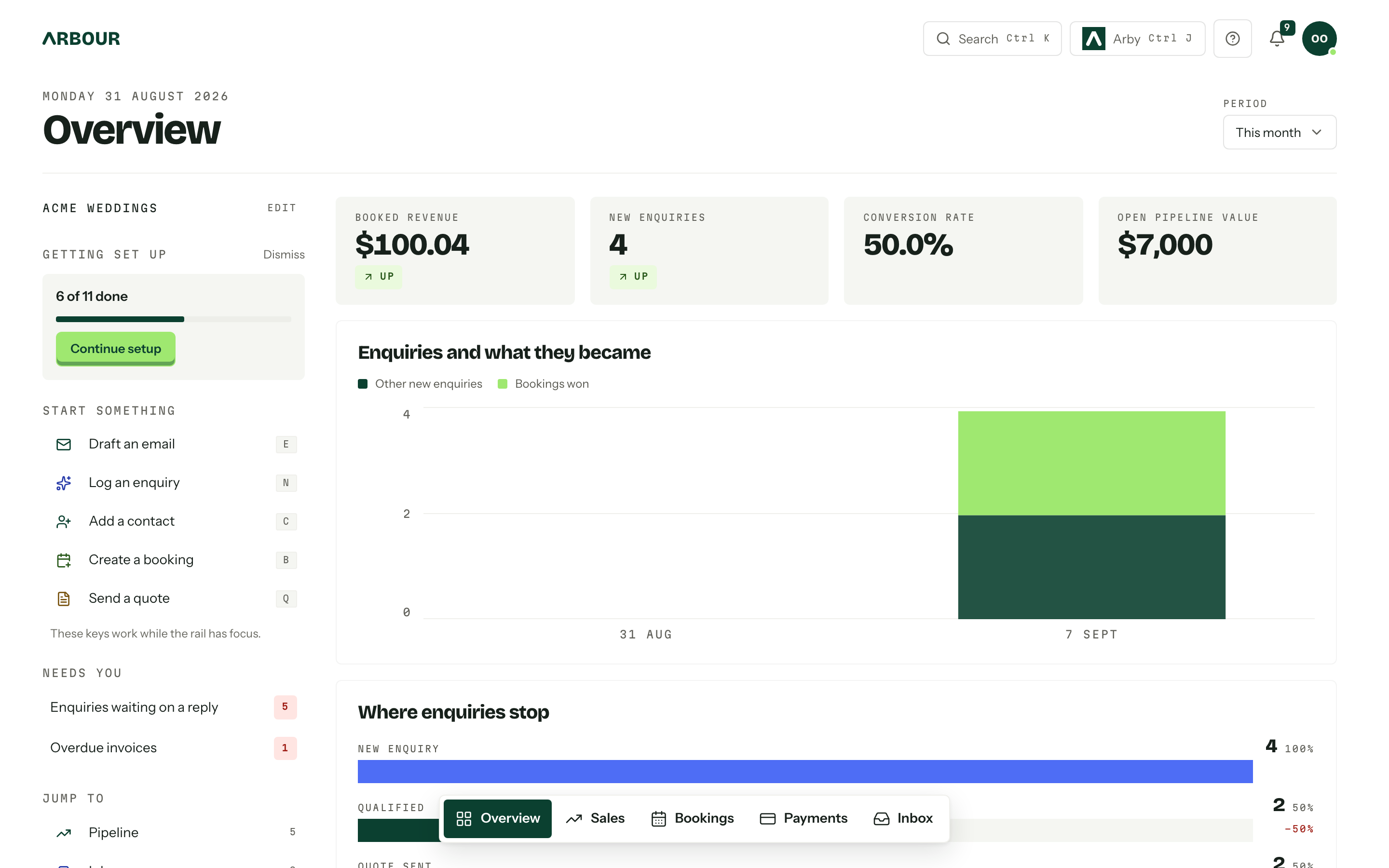
On a phone the page stacks: the setup card, the desk, the rail, then the reports.
What is in the rail
Three sections, and you choose which of them you keep.
- Start something lists the quick actions, each with its letter on the right. Draft an email only shows when your role can use email.
- Jump to is the places you work: Pipeline, Inbox, Bookings, Calendar and Tasks, with a count carried on the rows that have one. The pipeline count adds up the open enquiries in every workflow, and shows when your role can view reports. The row opens the workflow you had open last. Inbox counts unread email in the primary category plus unread client messages. Tasks counts your own tasks due today or overdue, and only shows when your role can view tasks.
- Your team is everyone holding a membership here, with their role underneath and when they were last active. Whoever is online now sorts to the top.
Owners get one more, Getting set up, pinned above the rest until the setup checklist is finished. It is not a preference and cannot be moved. See Getting started.
The desk
Three blocks at the top of the right column. Each row opens the record it names.
- Needs you names the work waiting on a person: overdue invoices, enquiries waiting on a reply, contracts out for signature, questionnaires unanswered, run sheets due and overdue tasks. Each kind shows its count and the top three by name, with a second line saying how long it has waited or how soon it starts. and N more opens the page where the rest live. A kind with nothing waiting is left out, and when nothing is waiting at all the block says so.
- Upcoming is the next five things on the books, soonest first, grouped by day: bookings, enquiries with a date, appointments and open tasks with a due date. A row's marker tells them apart: a solid green bar for a booking, a dashed outline for an enquiry, blue for an appointment, lilac for a task. An appointment row leads with its start time and names who is going; one a client booked that still needs your confirmation says awaiting confirmation. A job that started before today and is still running sits under today. Open calendar opens the calendar.
- Recently viewed holds the last eight jobs and contacts you opened, newest first, so you can pick up where you left off. It is yours alone and follows you between devices.
The desk only shows what your role can already see. A kind you have no access to never appears, and a recent record you can no longer open drops off the list.
Find inventory
Open Inventory under Sales in the main navigation when inventory tracking is on. With View inventory, you can browse stock and availability. If crew gear is enabled and your role has no inventory permissions, this opens your own assignments instead. See Inventory.
Quick actions
A quick action row does not drop you on a page, it starts the job, on the workflow you used last. Send a quote opens the enquiries board with the quote composer already up, because the row carries a ?start= parameter the page acts on. The page strips it as it opens the dialog, so a refresh never reopens what you have closed.
Five actions sit in the rail: Draft an email, Log an enquiry, Add a contact, Create a booking and Send a quote. The letter keys work while focus is inside the rail, and the rest of the catalogue answers to its letter there too, whether or not the row is on show. The full list is in Search and shortcuts.
Arranging the page
- 01Press Edit layout at the top right of the overview.
- 02
In the rail, use the arrows on a section heading to move it, or the cross to take it out.
- 03
On the desk, drag one block onto another and they swap places. The grip on each heading does the same from the keyboard: pick Swap with and the block to trade with.
- 04
Press the plus beside the organisation name or beside Desk to open Overview blocks, and tick anything you want back. Nothing is lost: a removed section or block goes back there.
- 05
Press Done. The order saves as you go, against your membership, so it is yours and not the organisation's.
Needs you and Upcoming share a row on a wide screen. Put Recently viewed between them and each takes the full width.
The same Edit layout controls the widgets in the reports, which is where Add widget appears.
When the report is missing
The reports on the overview cover every workflow. Reports can be filtered to one, and break the numbers down by workflow, with the enquiry funnel, stage and source reports read one workflow at a time.
The reports need the View analytics and reports permission. Without it the reports are a single card with links to packages, enquiries and bookings instead, and the rail and desk are unchanged. See Team and roles.