The calendar holds everything with a date on it: enquiries, bookings, appointments and time nobody is available. It reads the same records the boards do, so there is no second diary to keep in step.
Open the calendar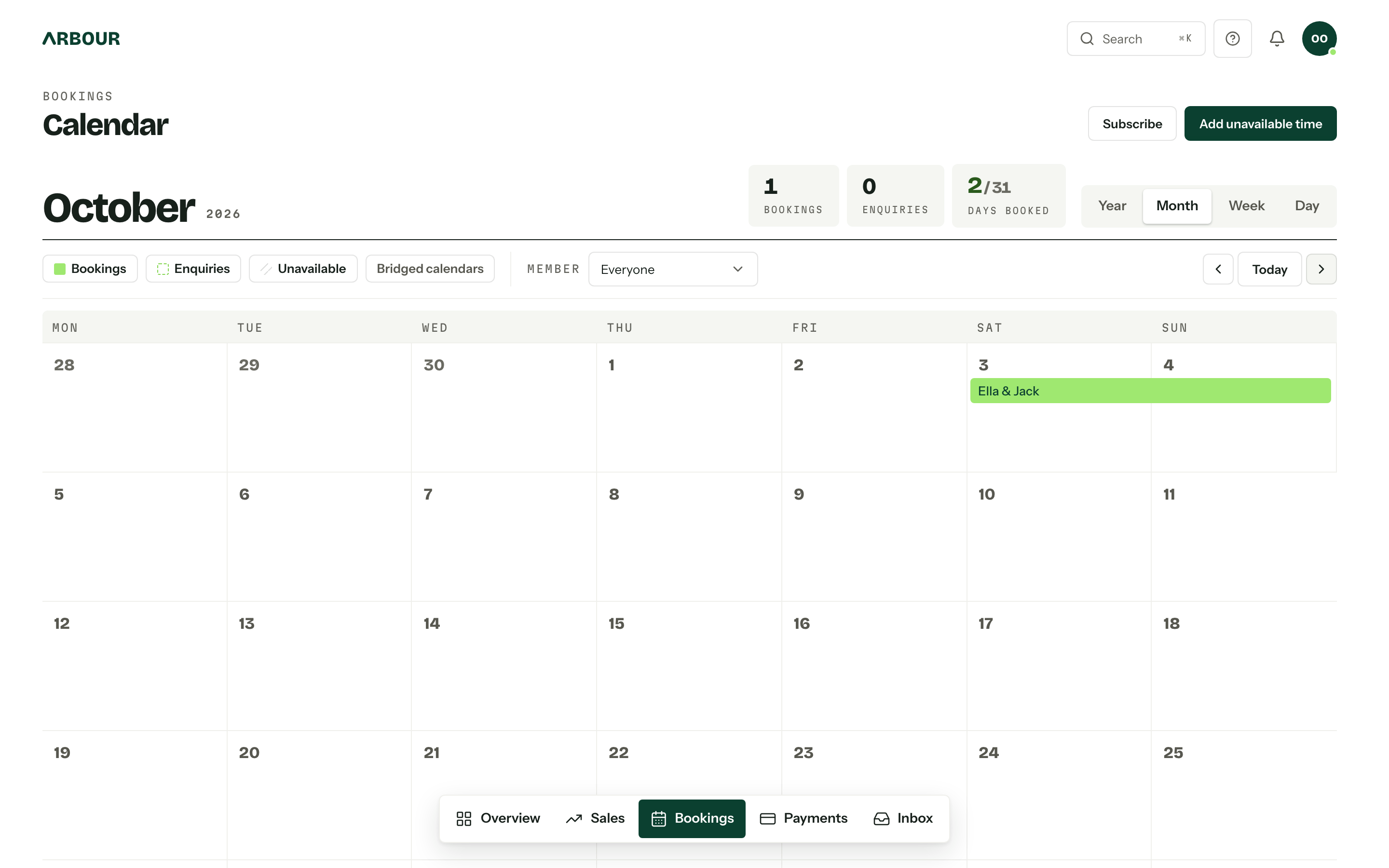
What is on it
Four kinds of record, listed under Records in Filters above the grid. Each row switches its kind on and off and doubles as the legend: the swatch beside a name is what the grid draws. The button says how many things are off, so a missing booking is one click from its answer.
| Record | What it is |
|---|---|
| Bookings | Confirmed jobs, filled in |
| Enquiries | Enquiries carrying an event date, drawn as a dashed outline |
| Unavailable time | Leave, travel, a day you are second shooting, yours or anyone else's |
| Appointments | Calls, walkthroughs and shoots on a job, as a chip led by its start time |
Every workflow shows on the one calendar. With more than one, Filters lists each under Workflows in its own colour: its bookings are drawn solid in that colour and its enquiries as a dashed outline of it. Switch a workflow off to take its dates off the grid for now.
Ranges are inclusive, so a two-day job draws a bar across both days. Closed records fade to grey with a strike through the name, and whether they appear at all is a calendar setting. Click an enquiry or booking for a preview. Dates come first, followed by the details and custom fields chosen under Event previews in calendar settings. Its name opens the job. Click an unavailable bar to edit it.
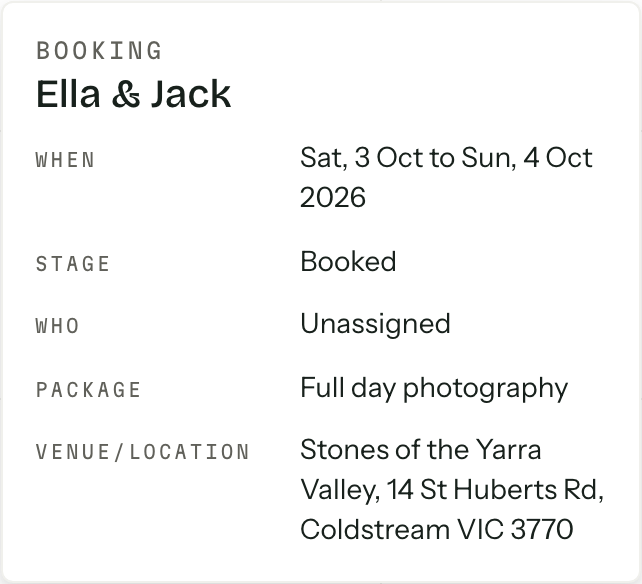
Appointments are points in a day, not spans: a chip on their day, led by the start time, in their workflow's colour. A request waiting for your yes is a dashed outline, and a completed one or a no-show fades with a strike. Cancelled appointments come off the calendar. Click one for a peek with the time, kind, who is on it and any status; its name opens the job at its Appointments card.
The Member picker narrows the grid to one person's work, or to Unassigned records. Organisation-wide unavailable entries stay whoever is picked; Everyone puts it back. It narrows appointments by who is on them, tasks by who holds them and payments by who is on the booking; your scheduled emails are always your own.
What is due
Below the bars, each day carries small chips, named by the job, for the things that fall due on it rather than fill it. Four kinds, switched on and off under Due items in Filters, and the calendar remembers which you have on.
| Chip | What it is |
|---|---|
| Payments due | An instalment on an issued invoice, named by its job. Needs permission to view payments. |
| Tasks | A task with a due date, yours or on your bookings, or every task if you can see them all. |
| Scheduled emails | Your own emails waiting to go out, at the time they send. Nobody else sees yours. |
| Run sheets | A booking's run sheet on the day, with how many entries it holds. |
A chip that slipped past its date turns coral and stays where it was, so paging back shows what is late. A paid instalment or a finished task fades on its day and never shows ahead of today.
Click a chip for a peek with the facts and a link through: a payment opens its booking's Money tab, a task opens on the tasks page, an email opens Outgoing, a run sheet opens the booking's Day of tab. The amount owed is in the peek, not on the grid. A task you may close has Mark done right there in the peek. When a day has more on it than fits, + N more opens the day's preview with the lot.
The Due tile beside the month's counts sums what is still to be paid in the period, turns coral when any of it is late, and names how many tasks are open.
Getting around
Year, Month, Week and Day switch the view, or press Y, M, W or D anywhere on the page. The calendar opens on the view you used last in this browser. Previous, Today and Next sit at the right end of the filter row and move by whatever you are looking at. Whatever period you are on sits large on the left, with its counts beside the switcher: Bookings, Enquiries, Days booked and, for anyone who can see payments or tasks, Due.
The month shows three bars and three chips a day, and tucks the rest behind + N more. That, or a day's number, opens a preview of everything on the date, with Open day to go to it. The week is the same seven columns with room for every bar and chip. Weeks start on Monday.
The year is twelve small months, every day a square coloured by the strongest thing on it: a booking beats anything bridged in from another organisation, which beats an enquiry, which beats unavailable time. Appointments leave the year alone, so a half-hour call never reads as a booked day. Hover a day for its preview, click it to open the day, or click a month name to open that month.
Day is the run sheet for the date: the jobs on it, then Due today (payments and tasks with no time of day), then a clock-ordered Schedule of appointments, run sheet entries and scheduled emails, then unavailable time. A request still awaiting confirmation is marked as one.
Blocking out a date
Time you cannot work is an Unavailable entry. Add unavailable time in the header opens the editor, and so does clicking an empty day, which prefills the date.
Block out a date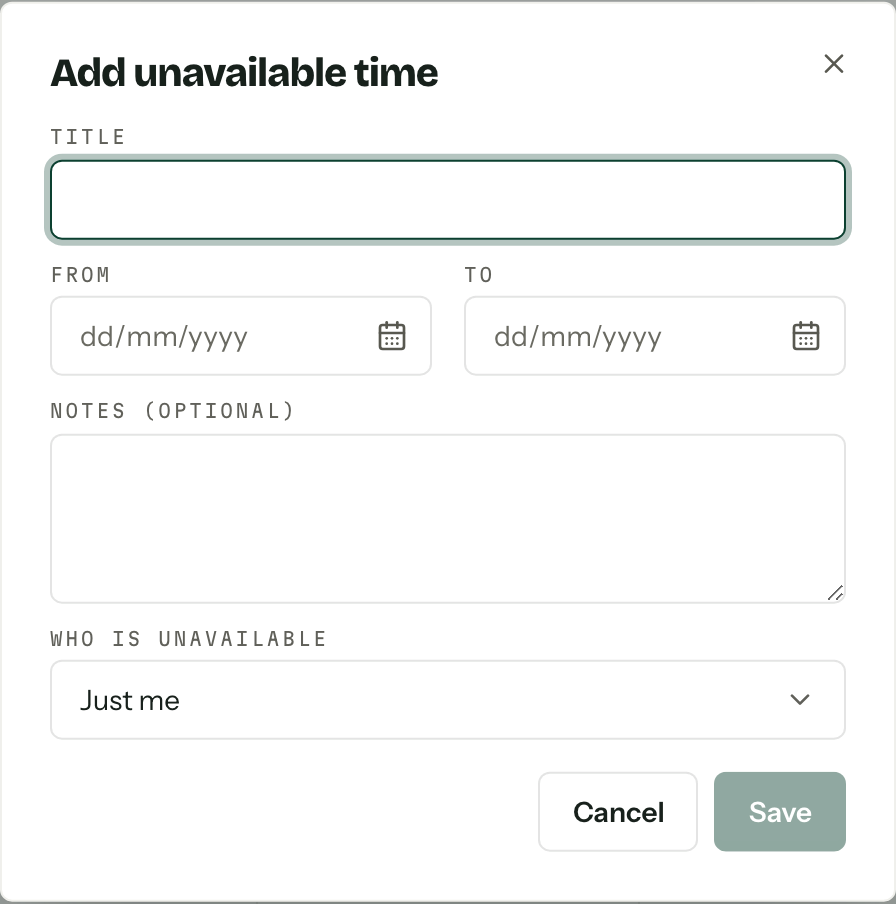
- 01
Give it a Title, then a From and a To date. A single day is the same date twice.
- 02
Add Notes (optional) if the reason matters to anyone else. Everyone in the organisation can read both.
- 03
Choose Who is unavailable: Just me, Whole organisation, or a named member.
Everyone can block out their own time, no permission required. Who is unavailable only appears for a role holding Manage anyone's unavailability, and without it someone else's entry opens read-only.
Saving can raise a warning: a member is already unavailable, or there is assigned work in that period. They are advice, not a stop sign, and Dismiss clears them.
Capacity is not shown here
Daily capacity and the availability bands in calendar settings decide what an enquirer is told when they pick a date on your form. The grid itself shows bars and nothing else.
Taking it with you
Subscribe hands out iCalendar links for your enquiries, bookings and busy time, ready to paste into Google Calendar, Outlook, Apple Calendar or anything that reads a URL. Appointments ride along on the enquiry and booking feeds at their own times, and drop off when cancelled. It goes one way: Arbour stays the source of truth, and providers refresh subscribed calendars on their own schedule, which can take a day.
Bridged calendars, the last section of Filters, is a different thing entirely. If you belong to more than one organisation in Arbour, it overlays their dates here in lilac, prefixed with the organisation's name. Clicking one of their jobs asks before switching you to that organisation. It is personal: nobody else sees your overlay, in either organisation.