Calendar settings control the organisation's timezone, availability estimates, event previews and feed links. Open Settings, then Calendar. Timezone and availability and Event previews each have their own Save button.
Open calendar settings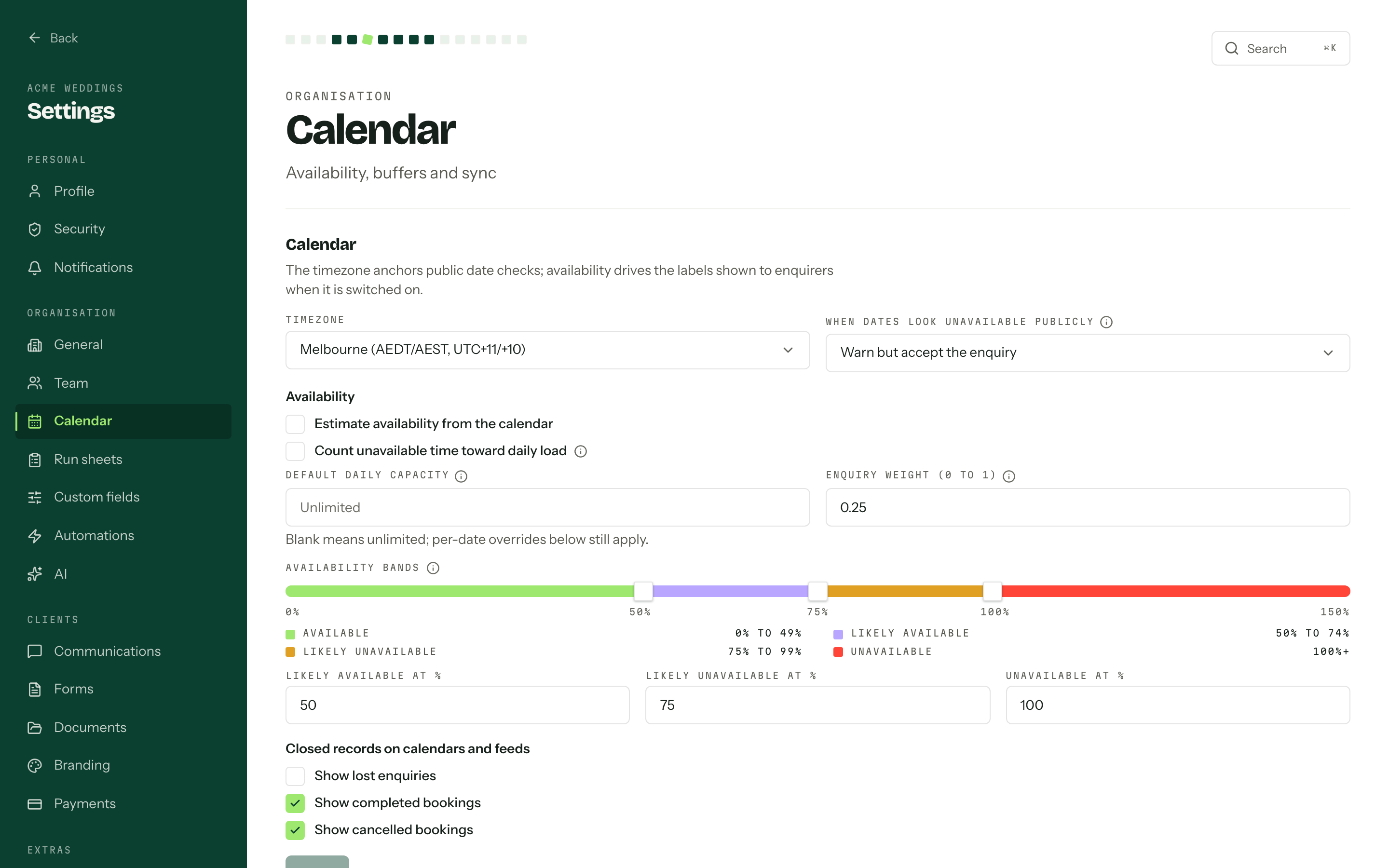
Timezone and the public policy
Timezone is the Australian zone your organisation works in, and Melbourne is the default. Every event date, run sheet time, appointment, member's weekly hours and public date check is read against it, so changing it moves the ground under existing run sheets and the times clients can book.
When dates look unavailable publicly decides what your enquiry forms do when someone picks a date that already reads unavailable: Warn but accept the enquiry, or Block the submission. See Enquiry form.
Availability
Off by default. Tick Estimate availability from the calendar and each day is scored as its load against its capacity, then shown to the enquirer as a label rather than a number.
- 01
Set Default daily capacity: how much one day can carry before it reads as full. Blank is unlimited.
- 02
Set Enquiry weight (0 to 1). A booking fills a day; an open enquiry has not been won yet, so it counts as a fraction. At 0.25, four enquiries load a day like one booking.
- 03
Drag the Availability bands, or type the three boundaries: Likely available at %, Likely unavailable at % and Unavailable at %. Each has to sit above the one before it.
Count unavailable time toward daily load brings blocked-out time into the sum, so leave and travel weigh a day the same way a booking does. Off, only enquiries and bookings count.
Capacity overrides replaces the default for a single date. Pick a Date and a Capacity, then Set. Zero makes the date unavailable outright. The list shows a year of overrides from today; Show overrides from, Previous year and Next year move it. Remove drops an override after asking, and the date goes back to the default capacity.
Closed records
Closed records on calendars and feeds is three tick boxes: Show lost enquiries (off), Show completed bookings (on) and Show cancelled bookings (on). They govern the calendar grid and the feeds together, appointments on those jobs included, so a change in one shows up in the other.
Event previews
Choose what appears when someone clicks an enquiry or booking on the calendar. Dates always appear first. Tick Stage, Who, Workflow, Package or any active custom fields, then press the Save button in Event previews.
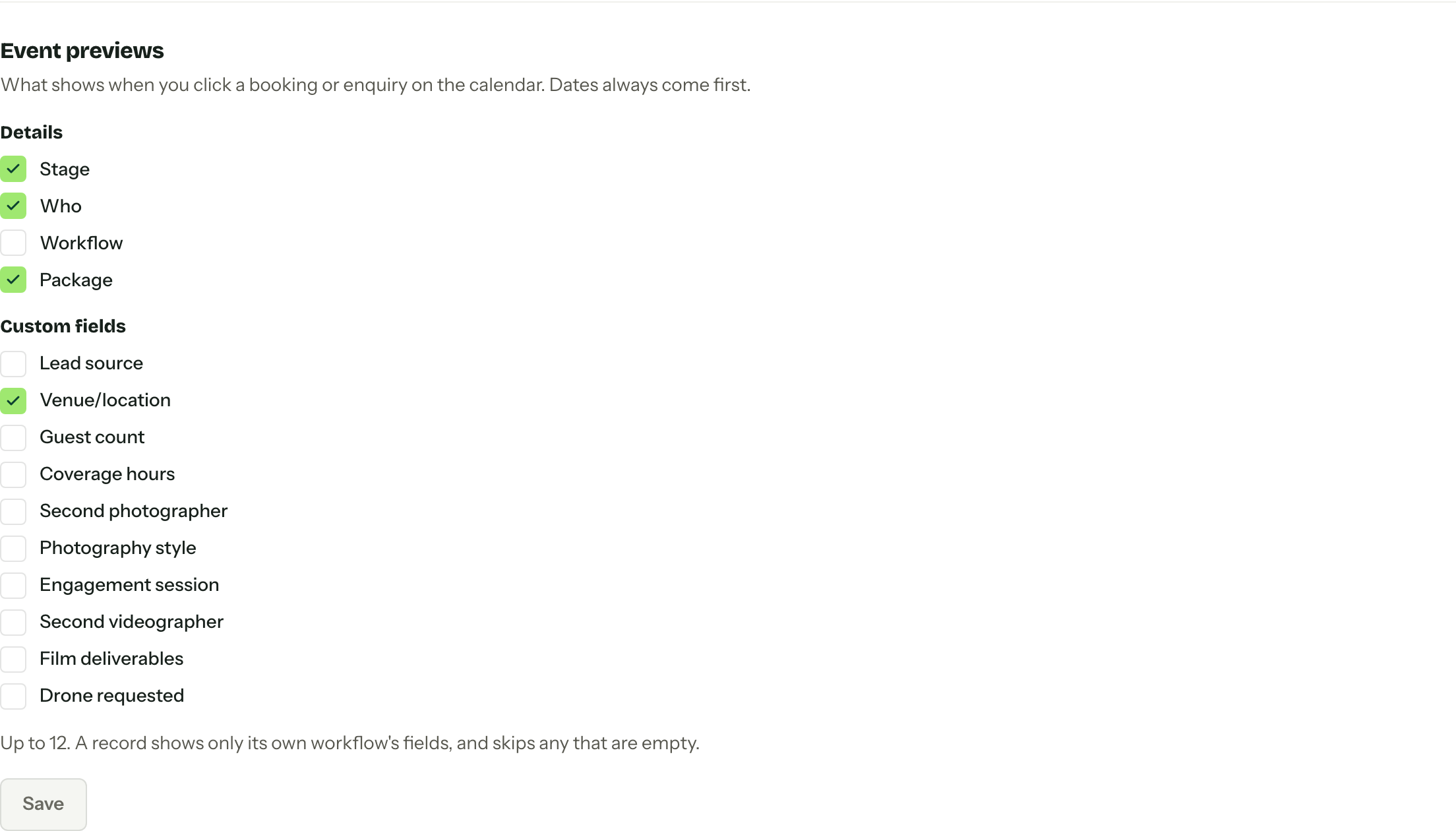
A preview can include up to 12 choices. It shows them in the order listed here and skips empty values. Custom fields appear only on records in their own workflow. Everyone in the organisation uses the same selection, subject to their permission to view each detail.
Feed links
Members create their own subscription links from Subscribe on the calendar, not from here. This page holds Members' feed links: every link that has been issued, whose it is, what it covers and its version.
Rotate swaps the URL out from under whatever subscribed to it, which is what you want when a link has gone somewhere it should not: the old one stops working at once. Revoke removes it, and the member can issue a new one from the calendar. Both ask first. What a link returns is worked out fresh on every fetch against the issuing member's current role, so taking a permission away, or removing them from the organisation, quietly empties the feed without anyone touching this page.
Publishing is not syncing
Arbour publishes calendars, it does not read them. There is no Google or Outlook connection writing back, and an event added in another app never appears here.
Permissions
Everything above the feed list needs Manage calendar settings. Members' feed links needs Manage members' calendar feeds. A role holding neither gets a note pointing back at the calendar, where its own subscribe links live.