Manage your business name, services, financial year and client portal here. It is the General page under Organisation in Settings.
Open organisation settings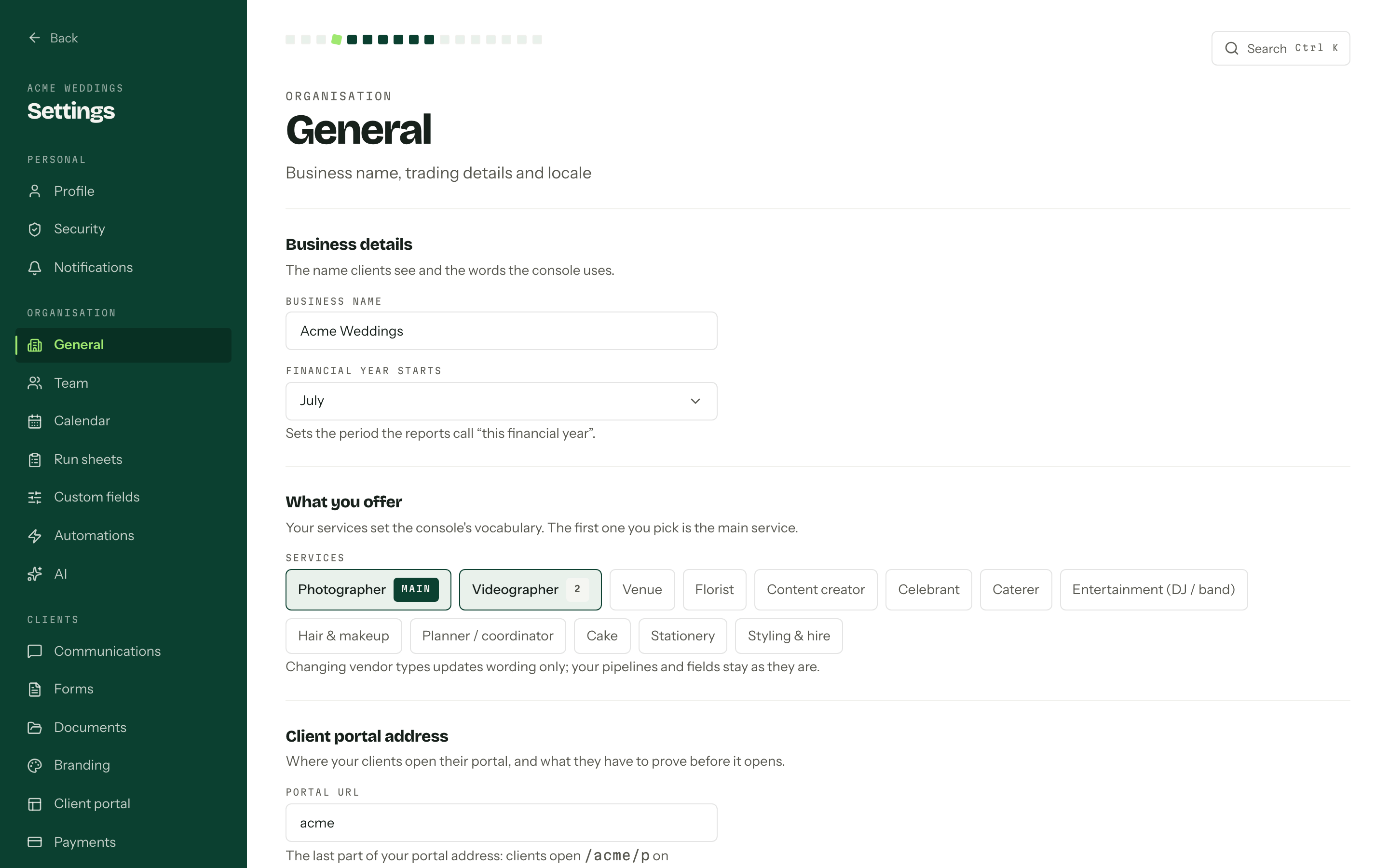
Business name
Business name is what clients read on quotes, invoices and the portal, and what your team sees in the organisation switcher. Edit it, then press Save changes. Discard appears next to it while there are unsaved edits and puts the form back the way it was.
What you offer
What you offer is a grid of vendor types. Tick as many as apply. The first one you pick carries a main badge and the rest are numbered, because the main one decides the words the console uses for a job, a client and what you hand over. A photographer gets a Shoot, a Couple and a Gallery.
Changing this is wording only, as the note under the grid says. Pipelines, stages, custom fields and enquiry form questions were seeded when the organisation was created and stay exactly as they are. Workflows and enquiry forms created later are seeded from the current services.
Inventory has its own switch in Inventory settings. Changing services here does not turn tracking on or off.
Financial year
Financial year starts picks the month that begins your reporting year, so reports know what This financial year means. July, for most Australian businesses. See Reports.
Portal URL
Portal URL is the slug inside every link a client opens: quotes, invoices, questionnaires and the portal itself. Lower case letters, numbers and hyphens, up to 63 characters, and the field tidies what you type as you go.
- 01Type the new address into Portal URL.
- 02Press Save changes. Every client link moves at once.
Links already sent keep working. The address you moved off is kept as a redirect and forwards to the new one, so a couple who saved a quote link last month still lands in the right place. Only the one previous address survives: move twice and the first is gone for good.
Once a day, no more
The portal address can only change once every 24 hours. A second attempt inside that window comes back with "This address changed in the last 24 hours. Try again tomorrow", and the field locks for the rest of the visit rather than inviting another refusal.
Portal email confirmation
Turn on Require the matching email before showing portal details, then press Save changes. Clients must enter the email of any contact linked to the job before they can see their portal. The primary contact and other linked contacts can all pass this check; an unlinked email cannot. The setting also applies to existing portal sessions the next time they load details.
Turn it off and save to remove that extra confirmation. The private portal link is still required.
Choose the portal sections and shared details in Client portal settings.
Who can change these
One permission covers the whole page: Manage organisation settings. A role without it sees "Your role cannot change these. Ask an owner or an admin." instead of the form. Owners always hold it, and the seeded Admin role does too. See Team and roles.
When the account is read-only, the page shows "These settings are read-only" above the form and every field is locked until the account is active again.
Your ABN and whether you are registered for GST are not on this page. They sit with the money settings, on Payments: see Payment plans.