Packages are what you sell, priced once and copied into every quote. They sit under Sales, on the Packages page: everything you offer listed down the left in selling order, with the selected package's details, performance and quote pricing beside it. Find a package above the list filters it by name.
Open packages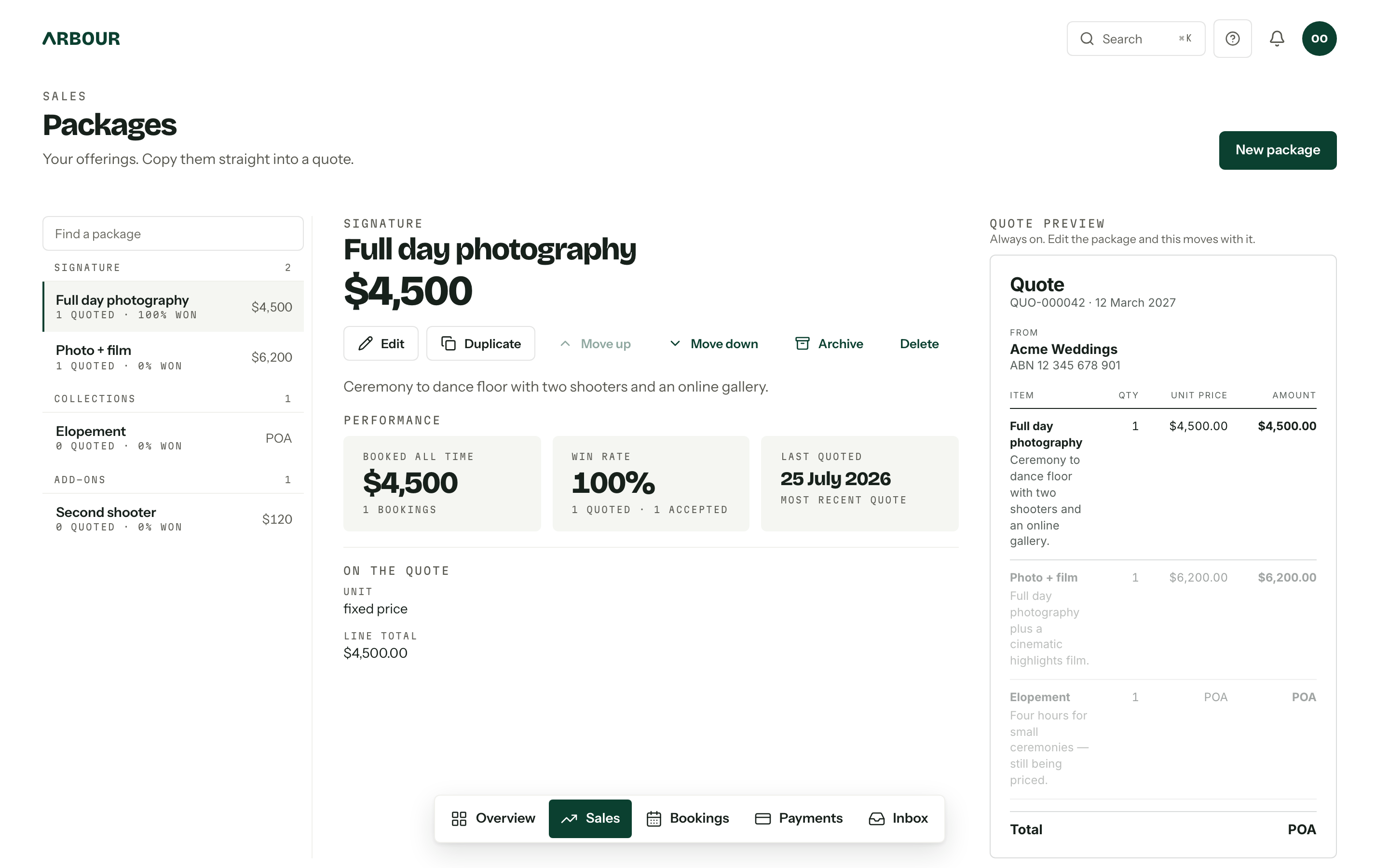
Add a package
- 01
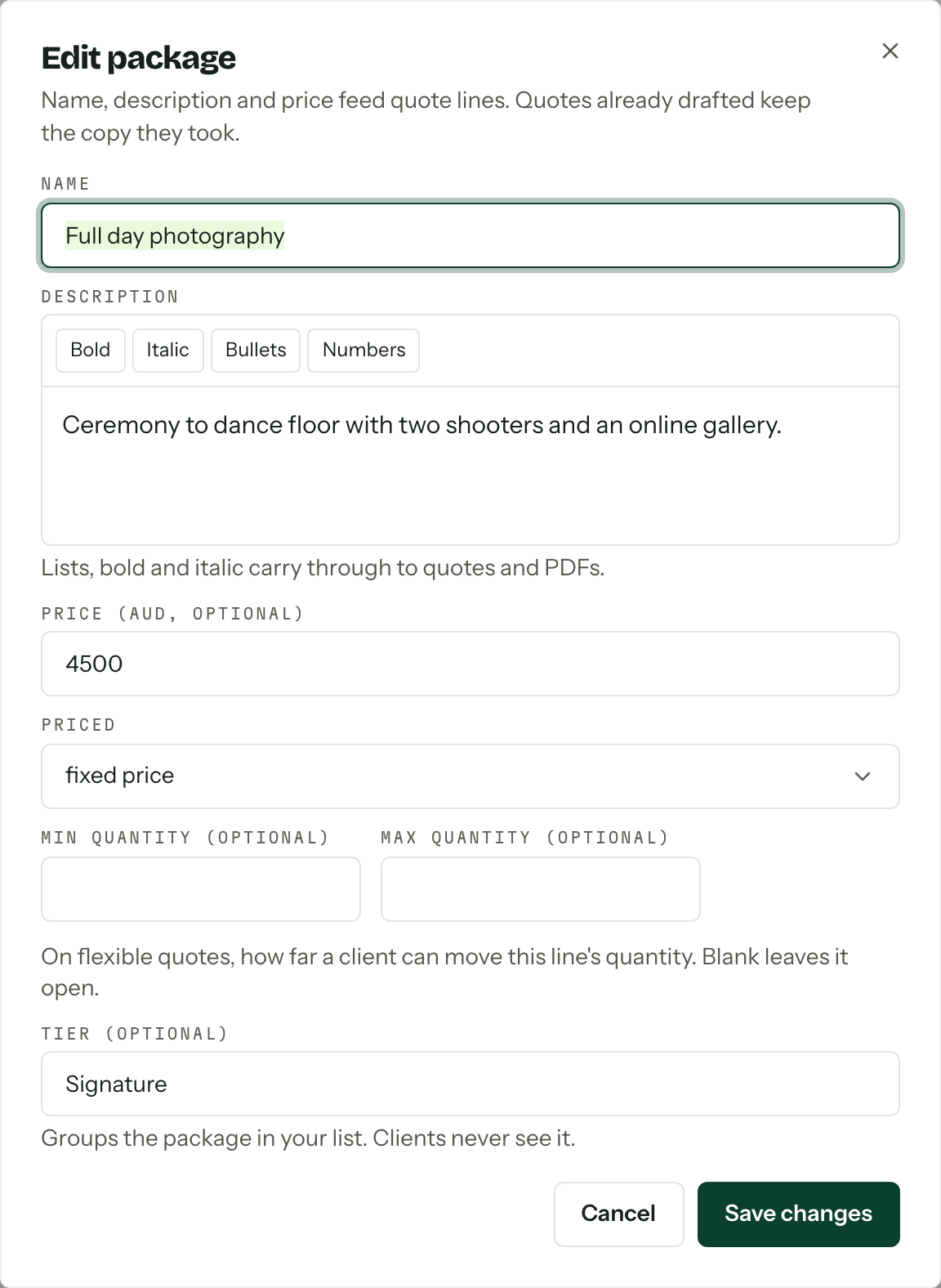
Press New package and give it a name. The description takes lists, bold and italic, and all of it carries through to quotes and PDFs.
- 02
Enter Price (AUD, optional) in dollars. Leave it blank for something you price case by case: it reads as Price on enquiry in the console and POA on the quote line.
- 03
Choose how it is Priced: fixed price, per hour, per person or per day. Anything but fixed asks for a Default quantity, the number a fresh quote line starts at.
- 04
Min quantity and Max quantity are optional. On a flexible quote they are how far a client may move that line's quantity, and blank leaves it open.
- 05Tier (optional) groups the package in your own list. Clients never see it.
Price and GST
A package price is one number. Whether it includes GST is decided once for the whole business, under Your prices in payment settings: Include GST, or Exclude GST (added on top). That field only appears once Registered for GST is on. Every quote and invoice snapshots your GST position as it goes out, so changing it later leaves the documents already sent alone.
Set the inventory a package needs
The package editor has a Requires section when inventory and hire tracking are on and you have permission to view inventory. Enable them in Inventory settings, then create the inventory items you want to include.
- 01Open the package's Edit dialog and find Requires.
- 02Press Add item, choose an item, and enter how many one unit of the package needs.
- 03Add the other items it needs, then save the package.
The accepted quote quantity multiplies each requirement. If a package needs 6 chairs and the client accepts a quantity of 4, Arbour reserves 24 chairs. This also applies to packages priced per person, hour or day, so set the requirements to match the quantity you sell.
Requirements are read when the client accepts the quote, including quotes already sent. Changing them does not change the quote's copied price or description, and it does not update allocations already made. Archived inventory items are skipped when requirements are allocated.
You can also apply the current requirements yourself with Add from package on a booking's Inventory card. See Stock for bookings.
Order and tiers
The order of the list is the order quotes offer packages in, which is why Move up and Move down sit on the package rather than in a separate mode. A tier is free text you invent: name one Signature and another Add-ons, and the list groups them under those headings in the order they first appear, with anything untiered under More. Duplicate gives you a copy to edit.
A package has no add-on list of its own. It is one line. Whether that line is an extra the client can take or leave is decided on the quote itself, where each line is Included, Pre-selected or Optional. See Sending a quote.
Archive, and when to delete
A quote line keeps the name, description, price and quantity bounds it copied when it was added. Editing those package fields leaves existing quote lines alone. Inventory requirements follow the separate acceptance rule above. To retire a package, use Archive: it drops out of the picker on new quotes, keeps its history, and folds into the Archived group at the foot of the list. Unarchive brings it back exactly as it was.
Delete is for mistakes only
Delete asks first and cannot be undone. Existing quotes keep their copied lines either way, so archiving is almost always the one you want.
Who can edit
The page needs View packages. New package, Edit, Duplicate, Move up, Move down, Archive and Delete need Manage packages on top of that. The Performance tiles (Booked all time, Win rate and Last quoted) need View analytics and reports as well, so a role can see the price list without seeing what it has earned. See Team and roles.