Payments is the invoice book read from above: what the organisation is owed, how late it is, what has come in over a period, and the two short lists worth acting on this morning. Contracts and the reports sit beside it in the same nav group, and how you get paid lives one press away in payment settings.
Open payments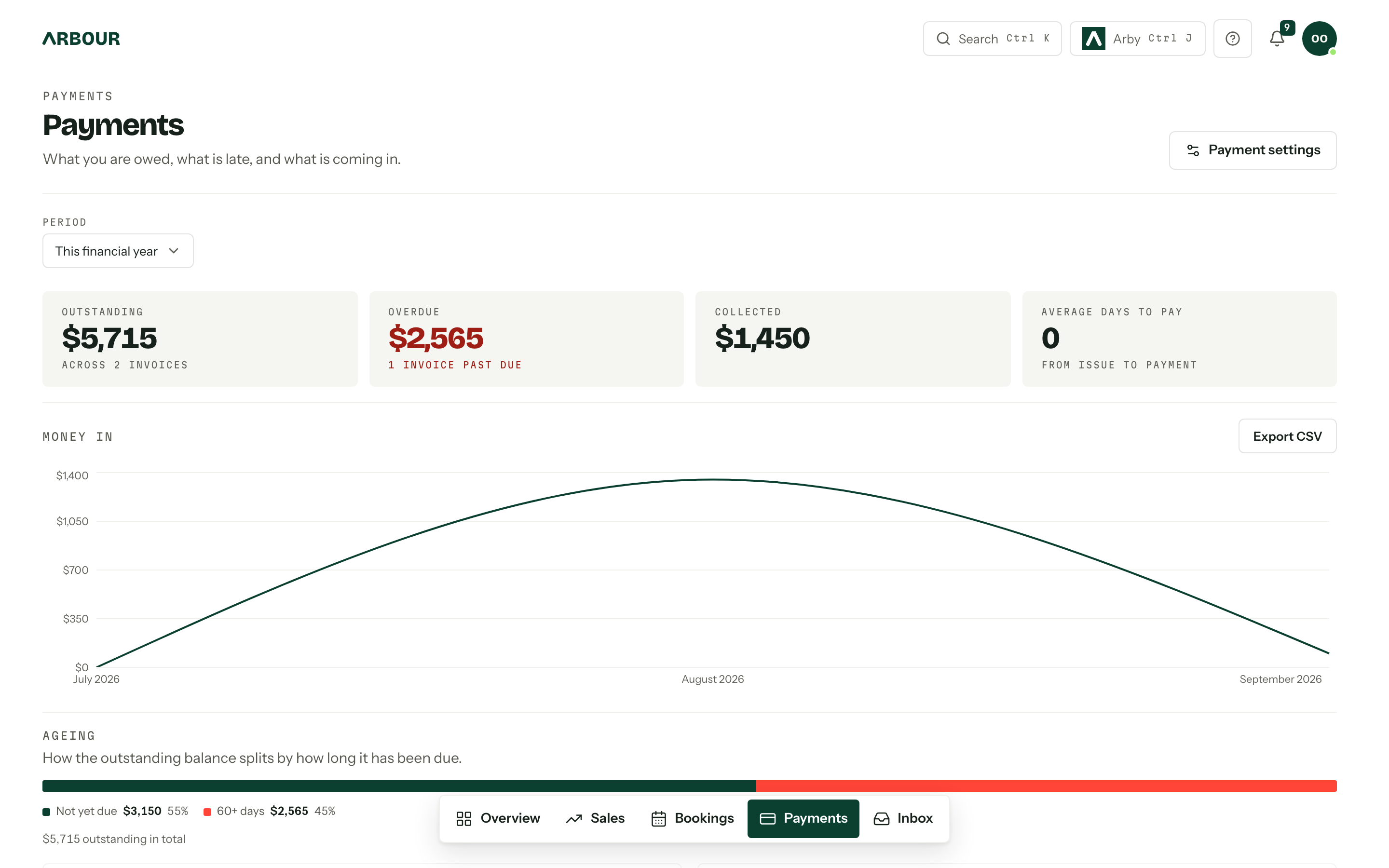
The four tiles
Outstanding is everything still owing on issued invoices, with the invoice count under it. Overdue is the part of that already past a due date, and it turns red the moment there is any. Collected is what actually arrived in the period, with the movement against the period before it. Average days to pay counts from issue to payment.
Period across the top sets the window for Collected, Average days to pay and the Paid against due chart. Outstanding, Overdue, the ageing bar and the two queues always read the invoice book as it stands today, whichever period is chosen. It offers This month, This quarter, This calendar year, This financial year, Rolling 12 months and Custom dates, and opens on the financial year.
Ageing and the two queues
The Ageing bar splits the outstanding balance by how long it has been due: Not yet due, 1-30 days, 31-60 days, 60+ days. Bands with nothing in them are left out rather than drawn empty.
Needs attention lists issued invoices already past a due date, longest overdue first, with how many days late and how much of it is overdue. Next 30 days lists the instalments about to fall due, soonest first. Each shows up to eight. Every row is a link into the job that owns the invoice, because that is where an invoice is actually worked on.
Not a ledger
Nothing is edited here. Raising, issuing, revising and voiding all happen on the job's Money tab. This page's job is to tell you which ones to open. See Invoices.
Paid against due
The Paid against due chart plots what came in each month (the solid line) against what the instalment plans said should fall due (the dashed one). The two lines sitting together is a book being collected on time; a gap opening under the dashed line is the shortfall to chase. Export CSV on the card downloads the figures behind it.
It reads the reporting data, so it appears only for a role that also holds view analytics and reports; a payments manager without analytics gets the book without the trend rather than an error. There is more of it in Reports.
Recording a payment by hand
A bank transfer or a handful of cash is recorded against the instalment it paid, in the Payments section of the invoice itself: Method, Amount (AUD), and Reference (private) for the transfer description. Part payments are fine. Paid, partially paid and unpaid are then worked out from that ledger rather than set by hand.
Card refunds are issued from your Stripe Dashboard. They show up here as a refunded amount on the payment row; they never reopen the invoice.
Who sees it
The whole page is behind view invoices and payments. A role without it gets Payments are not shared with your role instead of the numbers, and the Payment settings button appears only for someone who can manage them. See Team and roles.