The Embed on your website section of a form's editor produces a block of code you paste into your own site. It is the same form and the same submissions, minus the Arbour chrome: no heading, no card, no logo, nothing that says where the form came from.
Each form has its own snippet. Open the form you want from the Enquiry tab, because the code carries that form's id: paste the wrong one and the enquiries land in the wrong workflow.
Open the enquiry forms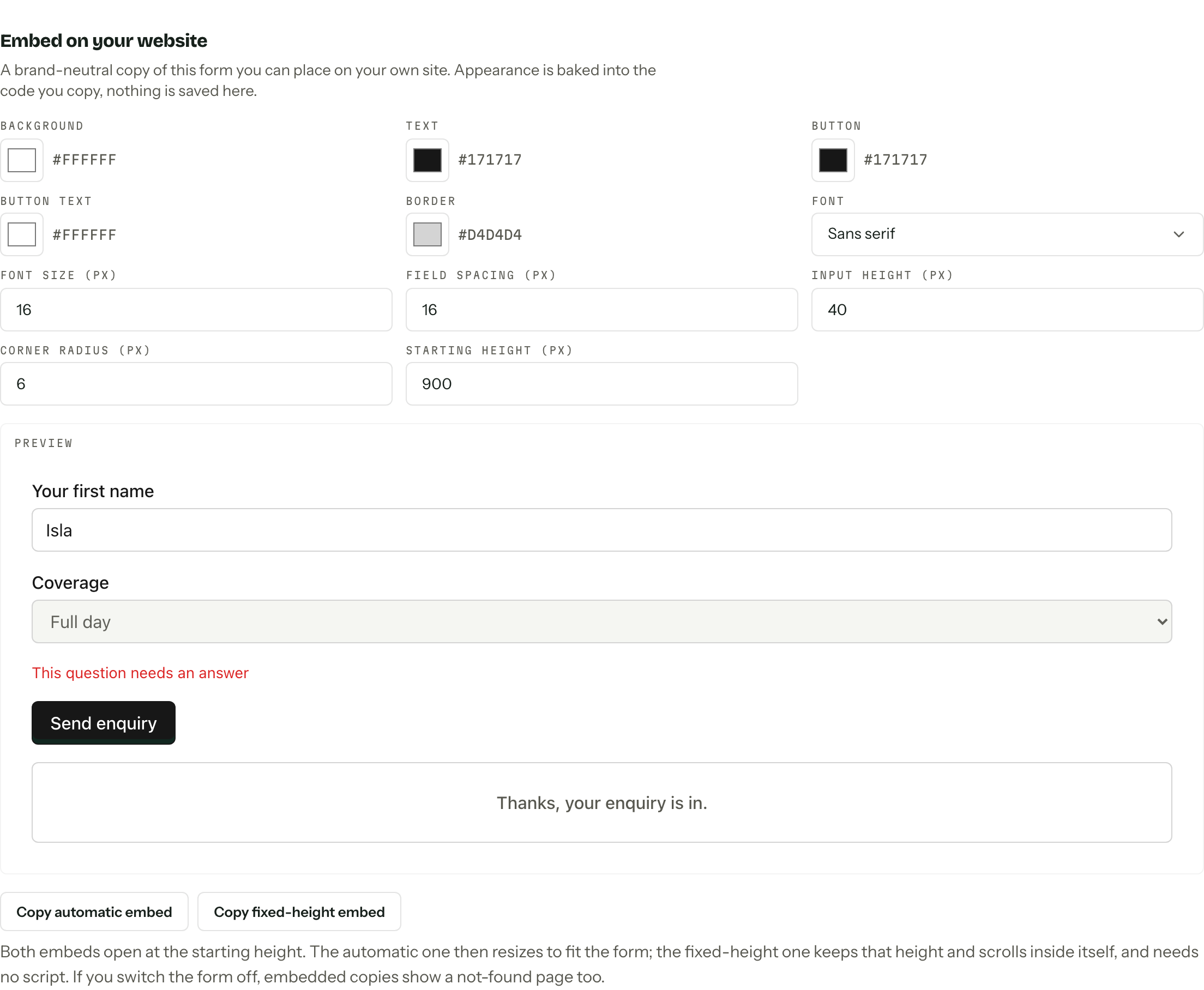
Make it look like your site
The controls cover five colours (Background, Text, Button, Button text, Border), a Font of sans serif, serif or monospace, and four sizes: Font size, Field spacing, Input height and Corner radius. Starting height sets how tall the frame opens, between 400 and 3000 pixels.
The preview beside them is a representative sample, not the live form, so it works while the form is still switched off.
Contrast is enforced
Text on background and button text on button must both clear WCAG AA at 4.5:1. Below that the copy buttons are disabled and a message names the failing pair and the ratio it managed.
Copy a snippet
- 01
Set the appearance, then press Copy automatic embed or Copy fixed-height embed.
- 02Paste the code into a custom code or embed block on your page and publish it.
- 03
Load the page and send yourself a test enquiry. It arrives in the pipeline like any other, tagged Source: Website embed.
| Snippet | What it does | Use it when |
|---|---|---|
| Automatic | An iframe plus a small resize script. The frame grows and shrinks to fit the form. | Plain HTML, Webflow, Shopify, Framer |
| Fixed height | The iframe on its own at the starting height. Longer content scrolls inside it. | Builders that strip scripts or fix container heights |
Both open at the same starting height, so if the script is blocked or stripped the automatic snippet behaves exactly like the fixed-height one. Some WordPress plans, Squarespace code blocks on personal plans and Wix HTML widgets fall into that category, so save yourself the argument and use fixed height there.
Content security policy
A site with a restrictive Content-Security-Policy has to allow your portal origin in frame-src for either snippet, and in script-src as well for the automatic one. Without the second, the resize script never runs and the frame stays at its starting height.
Appearance is baked in
Nothing on this section is saved. The settings are encoded into the code you copy, which means changing a colour here does not touch the form already on your website. After a change, the section shows a warning against each snippet you had copied: copy it again and replace the old code.
What crosses the boundary
Only a height. The frame reports its own size to the page around it, the script accepts that message from your portal origin alone, and no answer, visitor detail or embedding address goes the other way.
Switching a form off in its Enquiry form section, or archiving it, takes down the embedded copies too, since they render the same form. See Enquiry form.