Everything a quote or an invoice says that is not brand lives in Settings, under Documents: its number, the line at the foot, and which of your business details print above it. Logos, colours and fonts are set once in Branding and used by every document and the client portal. The contract templates sit further down the same page; see Contracts.
Open document settings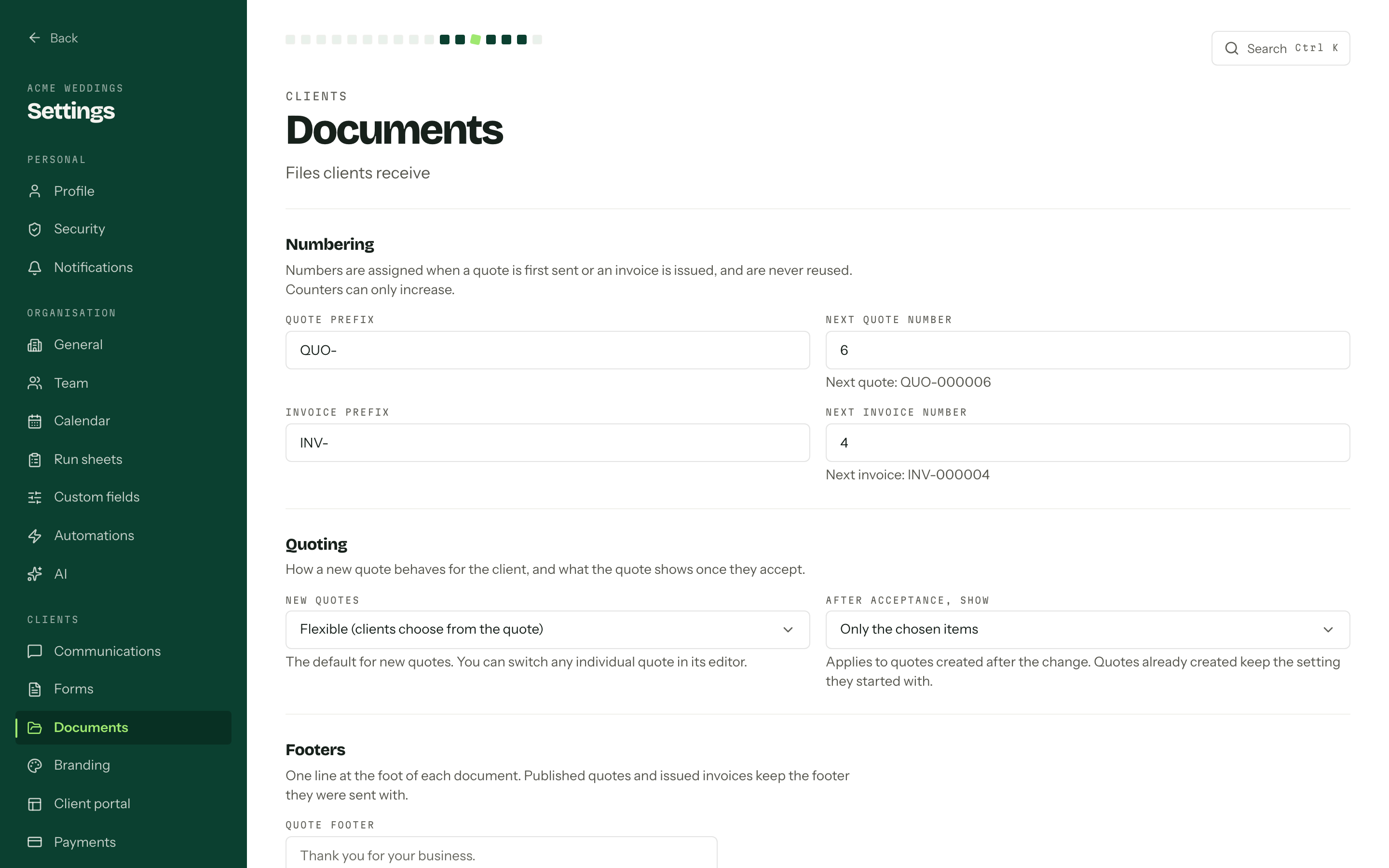
Numbering
Quote prefix and Invoice prefix sit in front of a six digit counter, so INV- and 42 print as INV-000042. The line under each counter previews exactly what the next document will carry.
- 01
Set Quote prefix and Invoice prefix. Up to twelve letters, digits, slashes, hyphens or underscores, and a prefix may be empty.
- 02
Set Next quote number and Next invoice number if you are carrying a sequence over from another system.
- 03Press Save document settings.
Counters only go up
A number is taken when a quote is first sent or an invoice is issued, and it is never reused. Counters can be pushed forward, never back, and an abandoned document leaves a permanent gap. That is the point: a sequence with no repeats is what an auditor is looking for.
Quoting
New quotes sets the default mode for a quote you create from here on: Flexible (clients choose from the quote) or Fixed (accept or decline as sent). Any individual quote can be switched in its own editor.
After acceptance, show decides what an accepted flexible quote looks like afterwards: Only the chosen items, or All items, with the chosen ones marked. It is stamped onto a quote when the quote is created, so changing it here only reaches quotes made later. More in Sending a quote.
Footers
Quote footer and Invoice footer are one line each at the foot of the document. Leave one blank and the PDF falls back to a plain Arbour line.
Footers ride along on a published quote revision and an issued invoice, so saving a change asks first (Save footers) and tells you how many documents keep the wording they were sent with. Only drafts and future documents pick up the new one.
What prints above the total
Your business name always prints. The four switches under Business details on documents decide what goes with it.
| Switch | What it prints |
|---|---|
| ABN | Required on tax invoices if you are registered |
| Business address | Your postal or trading address |
| Email address | Where replies about the document go |
| Phone number | A number clients can call |
The values themselves are the seller profile in payment settings, snapshotted onto each document as it goes out. If you are registered for GST the ABN switch is locked on, because a tax invoice has to carry it.
Changing anything above the contract templates needs the manage payment settings permission, the same one that governs payment settings. Without it the page says These settings are read-only.